



Banning a cheater is the easy part. Keeping them banned is where it gets expensive. On a free-to-play PC game a new Steam or Epic account costs nothing, so an account ban can buy you an hour before the same player is back on the same machine under a new name. And while they’re gone, the score they cheated their way to can keep sitting on your leaderboard, pushing honest players down a rank.
Both of those got fixed this cycle. Device bans in AccelByte Gaming Services (AGS) now cover Steam and Epic Games, and leaderboards can drop hidden players on the server. After that you’ll find the rest of what shipped between AGS 2026.3 and 2026.5.1, a new AGS CLI release, and our AI plugins.
Device Bans Now Cover Steam and Epic
Why Account Bans Leak on PC
Console already had this covered. AGS tracks Xbox and PlayStation devices automatically, so a device ban there stops a player at the hardware, not the account. PC didn’t have an equivalent, and PC is where alt accounts are cheapest.
Say you ban a player at 9pm for running an aimbot. At 10pm a fresh Steam account signs in from the same PC, goes through your login flow like any new player, and lands in matchmaking. Nothing on the backend connects the two, because the only thing you banned was an account ID. Your support team hears about it the next day from a player report, bans the new account, and the loop starts again.
How PC Device Bans Work
Device tracking is now available for Steam and Epic Games. You switch it on per platform in the Admin Portal under Foundations → Banned Devices → Settings. Once tracking is on, new sign-ins on that platform record the device they came from, and device bans start being enforced against it.
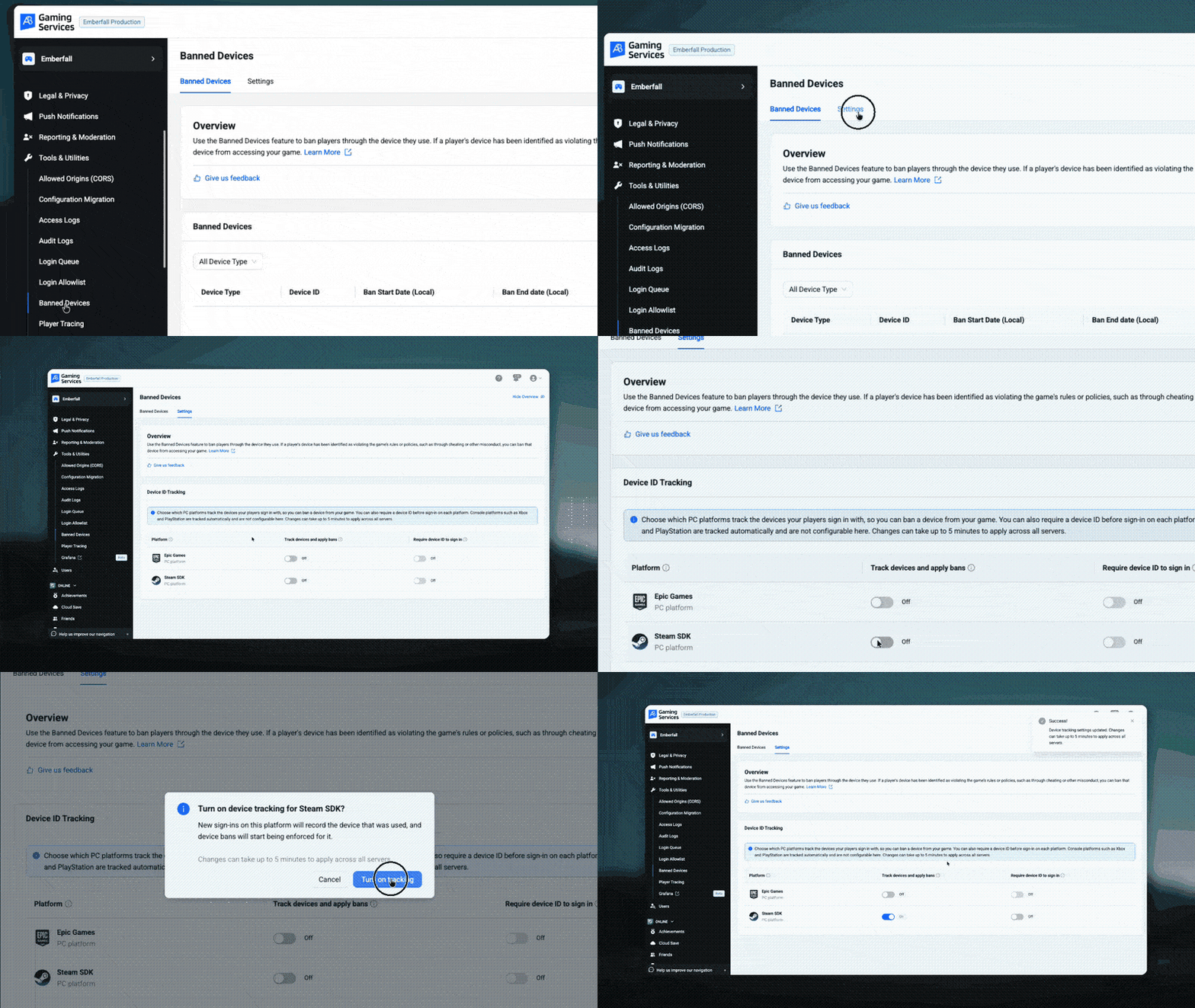 From there, a ban follows the machine rather than the account. Ban a device and it’s blocked on every PC platform you track for that game, so the player who gives up on Steam and tries Epic runs into the same wall.
Games on the AGS SDK send the device ID at login automatically, so most teams won’t write new integration code for this. You can also require a device ID to sign in on each platform, which closes the gap where a login simply doesn’t send one.

Before You Turn It On
A few things worth knowing first:
-
Keep banning accounts too.
Device bans back up account bans, they don’t replace them. A player on a second machine is only covered by the account ban. -
Check your SDK version.
Device bans need a supported SDK that sends the device ID at login. Confirm that before you switch tracking on. -
Don’t require a device ID too early.
Turn on Require device ID to sign in only once every live build sends one, or players on older builds may not be able to sign in. -
Give it a few minutes.
Settings changes can take up to five minutes to apply across all servers.
It’s also worth being honest about what this does and doesn’t buy you. No device identifier lasts forever. New hardware, a second PC, or a determined enough cheater will get around it eventually. What changes is the cost of coming back: it goes from “make a free account” to “find another machine,” and that’s a much bigger ask.
Availability
Private Cloud, from AGS 2026.5. Not yet available on Shared Cloud. Read the release notes.
Hidden Players Drop Off the Leaderboard
Hiding a player from a leaderboard used to be half a fix. The flag was set on the backend, but each game client had to filter that player out of what it received. Miss it in one client build and the hidden player shows up again. Filter them out but forget to renumber, and the player who should now be 4th still reads 5th.
With Hidden Player Filtering on, AGS does that work on the server. A hidden or moderated player’s score stops holding a rank before the response reaches the game, and everyone below them moves up.

It’s a per-leaderboard setting and it’s off by default for new and existing leaderboards, so nothing changes until you flip it. Open a leaderboard in the Admin Portal under Online → Leaderboards and turn on Hidden Player Filtering.
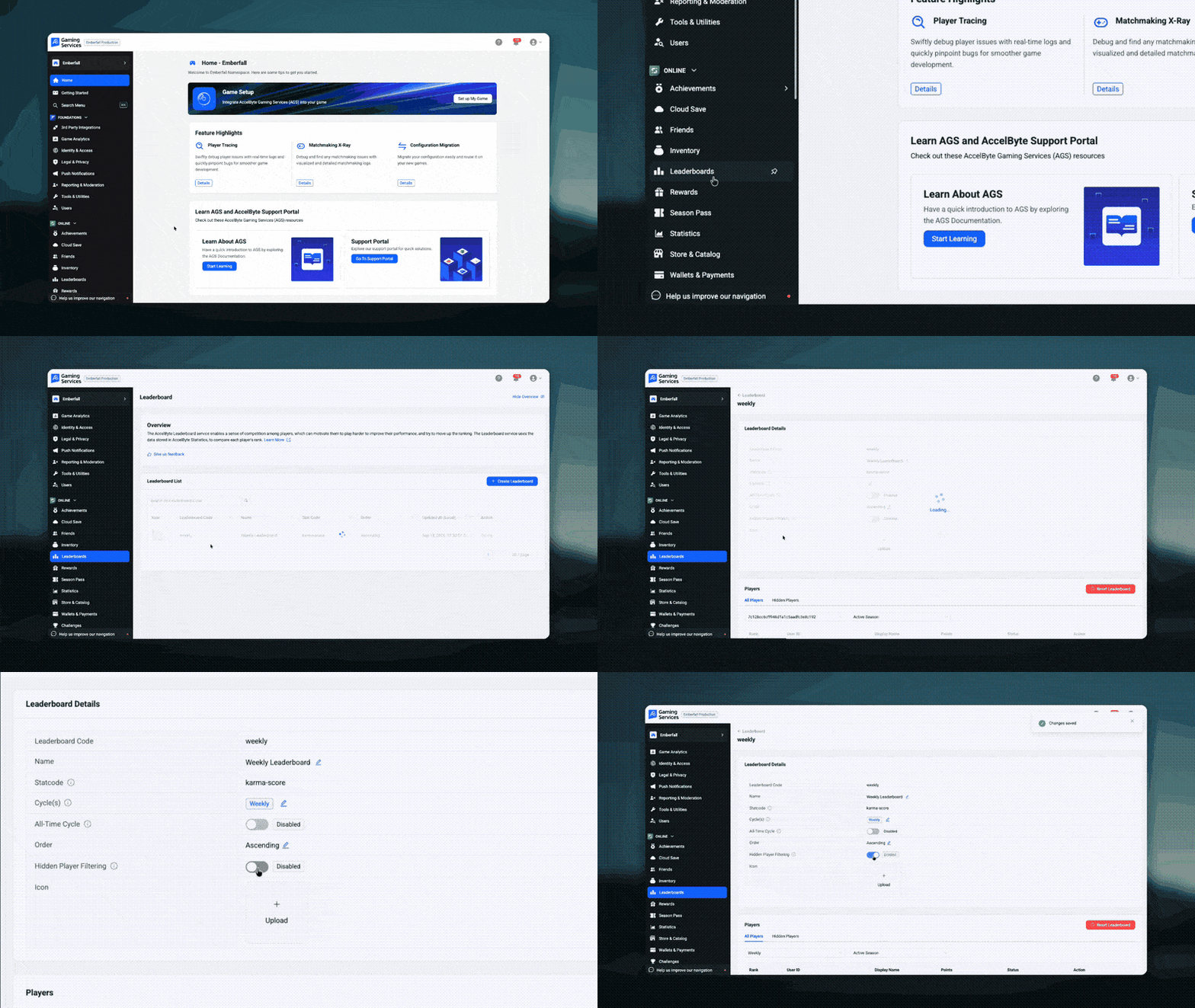 If your client already filters hidden players, turning this on doesn’t break anything. The client-side filter just stops finding anyone to remove, and you can delete that code whenever it suits you.
Availability
Shared Cloud and Private Cloud, from AGS 2026.4. Read the release notes.
Also Shipped Recently
The rest of what landed between AGS 2026.3 and 2026.5.1. Each item links to its entry in the release notes.
-
Live log streaming and security scans for Extend apps, both in the Admin Portal. Watch an app’s logs in real time and scan its Service Extension API endpoints for vulnerabilities.
-
Support for Sony’s new sandbox submission system. DEV and CERT replace sp-int and prod-qa, so update your PSN configs before the old environments are retired.
-
Latency- and loss-aware P2P path selection, behind a config flag. GetConnectionStats reads RTT and packet loss from game code.
-
Unreal Engine 5.8 support across the SDK, OSS, and Network Utilities plugins.
-
Foundations as its own package, so you can run the core services without buying Online or Multiplayer too.
-
Analytics S3 Exporter, a one-time copy of your historical event data into your own S3 bucket ahead of the upcoming retention policy.
-
Password-protected game sessions and parties, using the new PASSWORD_PROTECTED joinability type.
-
Extend App UI, so you can build a web UI for an Extend app and embed it in the Admin Portal.
-
Unreal Engine 5.0 to 5.4 support is deprecated. Plan your move to 5.5 or later.
Featured Updates
AGS CLI v0.5.1: Pen-Test Extend Apps from Terminal
The AGS CLI puts every AGS API behind one command shape, ags <service> <resource> <method>, and since v0.5.0 it covers Extend and AMS image uploads too. We wrote about why it exists in Beyond the Chat Box. The short version: the same command works from your terminal, a CI job, or an AI agent.
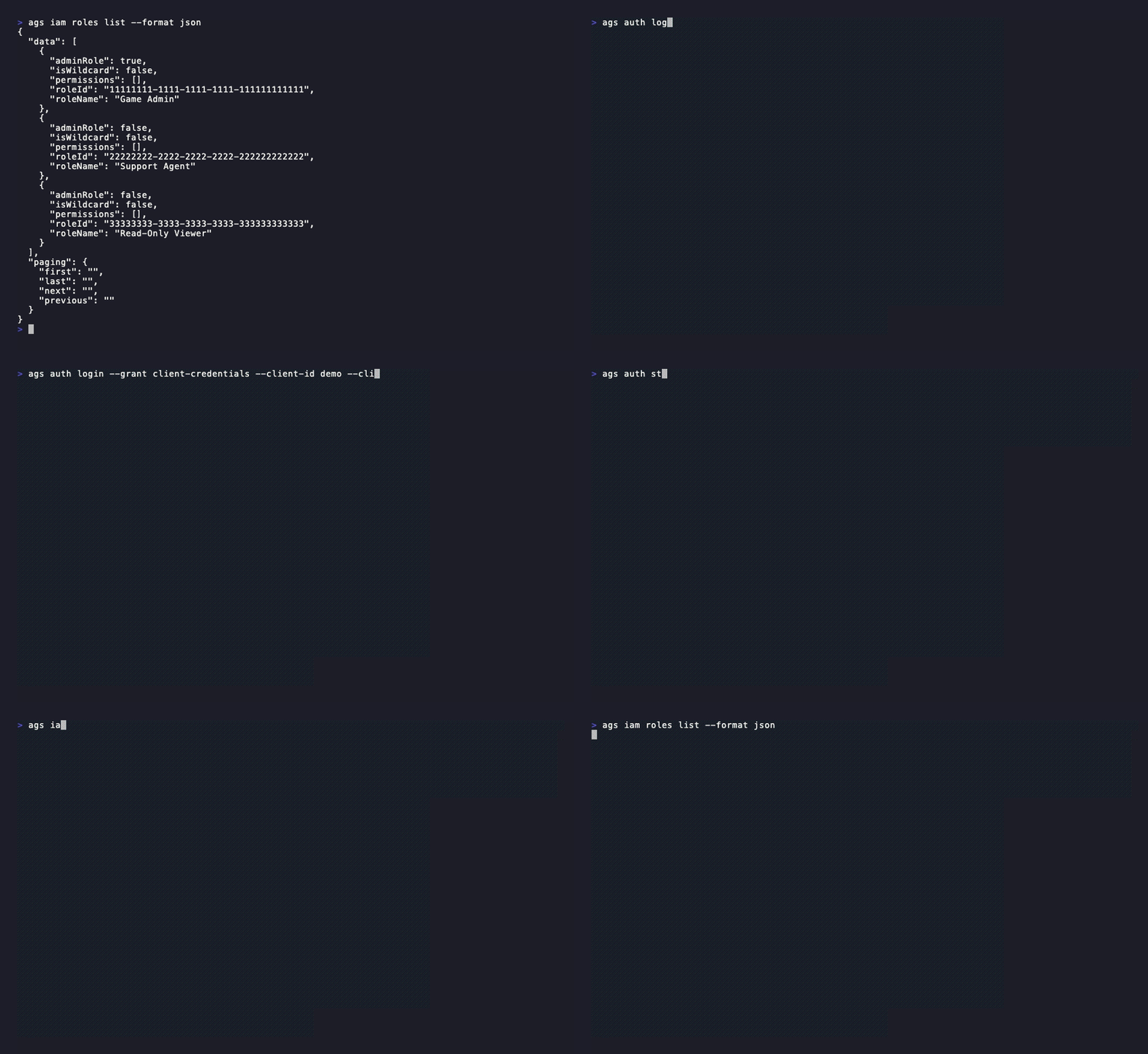 The headline in v0.5.1 is security assessments. Point the CLI at an Extend app and it finds the endpoints worth testing and the permission each one needs, then requests a pen-testing engagement and downloads the finished report as PDF or Markdown.
ags extend security-assessment request --wait
ags extend security-assessment result
Two details matter if you plan to put this in a pipeline. Endpoints that accept PUT, PATCH, or DELETE are listed and confirmed before anything is sent, because the assessment may generate test cases that modify or delete data through them, so point it at a dev or staging app before production. And --wait polls every 10 seconds until the engagement completes or fails, capped at 30 minutes by default, so a CI job can block on it.
Also in this release:
-
ags update tells you when a newer release exists, and ags update --install upgrades your copy in place. Nothing updates unless you run it.
-
ags auth token prints the current session’s access token and nothing else, so another tool can reuse your login instead of running its own.
-
--wait on the Extend app lifecycle commands, which now call the CSM v5 API. Existing IAM roles keep working. A wait that times out exits with code 6 rather than 3, so CI can tell “still rolling out” from “failed.”
# Reuse the CLI's login from another tool
curl -H "Authorization: Bearer $(ags auth token)" "$AGS_BASE_URL/iam/v3/public/users/me"
One change can break a script. ags ams upload now prints its result block, including the Image ID, to stdout and the “uploaded” banner to stderr. It used to be the other way round, so a redirect saved the banner and lost the Image ID. If you capture that output, read the Image ID from stdout. --format json is unchanged.
The ags extend and ags ams commands are still in early preview, so flags may change before you build automation on them.
To install fresh, or to upgrade from v0.5.0, run the installer. From v0.5.1 on, ags update --install does it for you.
# macOS and Linux
curl --proto '=https' --tlsv1.2 -LsSf https://github.com/AccelByte/accelbyte-ags-cli/releases/latest/download/accelbyte-ags-cli-installer.sh | sh

# Windows (PowerShell)
powershell -ExecutionPolicy Bypass -c "irm https://github.com/AccelByte/accelbyte-ags-cli/releases/latest/download/accelbyte-ags-cli-installer.ps1 | iex"
The CLI sends anonymous usage telemetry. Set DO_NOT_TRACK=1 to turn it off. Full details are in the v0.5.1 release notes.
AI Plugins for Your Coding Agent
AccelByte AI Plugins are skills for Claude Code, Codex, Cursor, and other agents. They keep your agent working from real AGS references instead of guessing at API shapes that changed two SDK versions ago.
-
/ags init scans your project, detects the engine, and walks you through SDK, CLI, MCP server, and IAM client setup.
-
/ags-extend helps you pick an Extend pattern, then scaffold, test, and deploy the service.
-
/teammate health-check reviews your AGS integration for unfinished work, deprecated APIs, and unsafe token handling, and drops any finding it can’t back with a source. It’s in early access, and we wrote up how it works.
# Claude Code
/plugin marketplace add AccelByte/ai-plugins
/plugin install accelbyte-ai-plugins@accelbyte

# Any other agent
npx skills add AccelByte/ai-plugins
Try It, Then Tell Us
If you’re on Private Cloud, PC device bans are one Settings page away. If you’re on Shared Cloud, hidden player filtering is a toggle on any leaderboard you already have. Either way, the fastest way to shape the next one of these posts is to tell us what broke, what’s missing, or what you worked around. Find us on Discord.
Build on the latest AGS
Device bans, server-side leaderboard filtering, the CLI, and the AI plugins all run against the same AGS backend. It’s free on Shared Cloud until your game hits 30 concurrent users, so you can start building against it today, or talk to us about Private Cloud if PC device bans are the part you need now.
You're almost signed up!
Verify your account by following the instructions sent to .
If you still haven't received an email, please check your spam folder.
Featured Blog Posts


Featured Customer Stories



Bring your first player online today.
Get started for free, and scale as your game grows.