


AccelByte has been building AI capabilities into its products for a while now not just as features, but as something that changes what QA teams and engineers can actually do day to day. The AccelByte Development Toolkit (ADT) already ships with a built-in AI assistant designed to take engineers from crash events to fix without manual triage. That's not new.
What is new is what happens when a studio connects their own LLM directly to ADT's crash data through MCP server and what that integration reveals about where fully automated crash pipelines are heading.
Striking Distance Studios (SDS), the team behind The Callisto Protocol, are one of the early teams doing exactly that. They already had a working LLM inside JetBrains Rider. What they needed was structured, real-time access to actual crash context from ADT — the log files, stack traces, crash metadata — so their IDE's AI had something concrete to reason about rather than making educated guesses.
AccelByte's MCP server for ADT closed that gap.
This case study covers what crash triage looked like at SDS before this integration, what changed with access to ADT's crash context, and the gaps that surfaced that are now shaping ADT’s roadmap.
The Situation Before
Before integrating ADT's MCP server, crash triage at SDS worked the way it works at most studios: a crash fires, it lands in a queue, and an engineer picks it up when they can.
Even under ideal circumstances, resolving a single crash could consume at least two hours of engineering time, from reading logs and tracing stack traces to identifying the root cause, writing a fix, and getting it into code review. For more complex issues, the process could stretch across multiple days.
But the real cost was not only the time spent on any one crash, it was the backlog that formed while engineers worked through the crashes already in front of them.
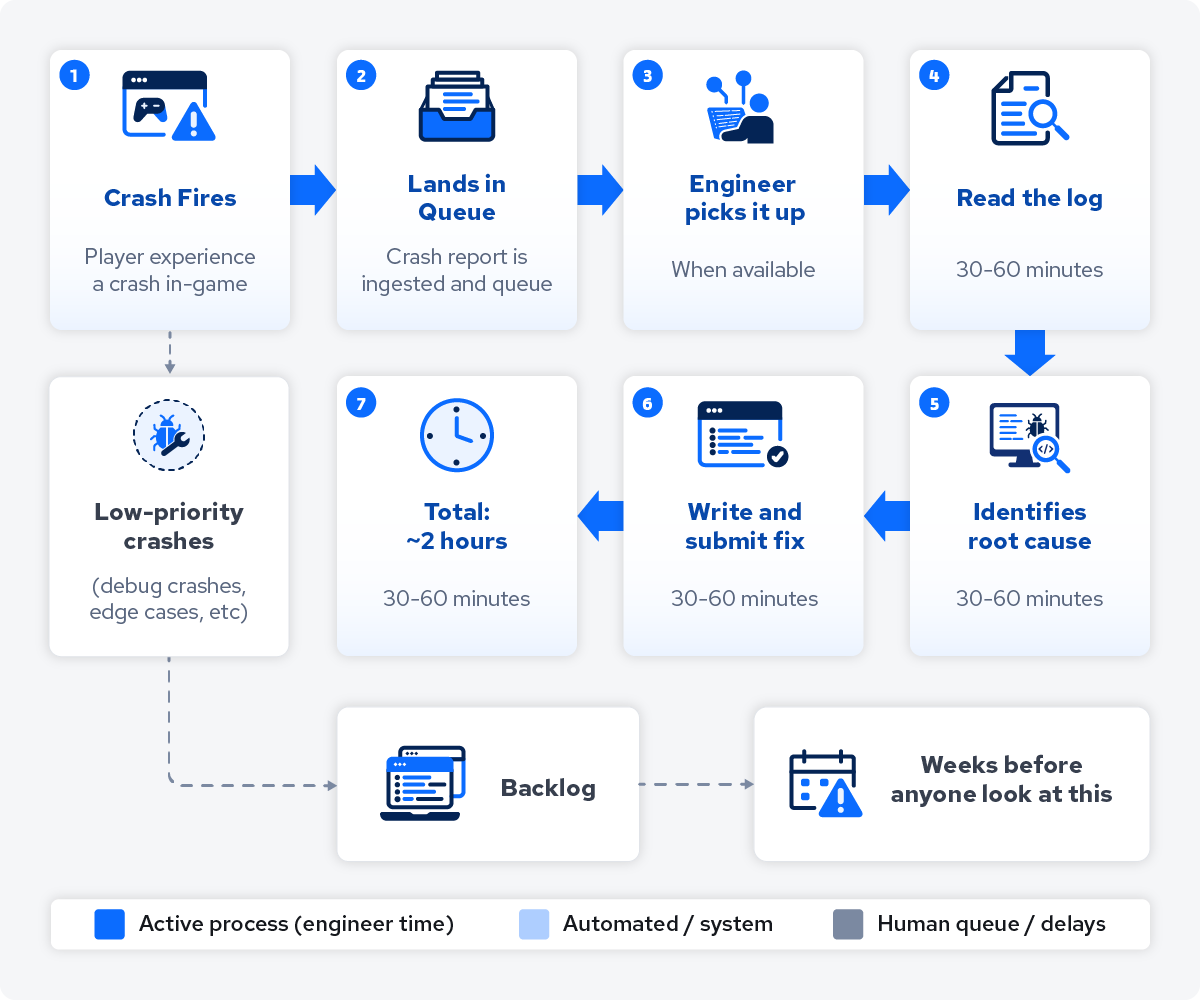
Low-priority crashes like debug errors or minor garbage collection issues rarely received attention because engineers focused on critical failures. For instance, a simple out-of-scope variable reference wasn't worth two hours of manual triage. Consequently, these minor issues accumulated throughout a sprint, forming a backlog of unresolved debt.
The other constraint was that QA had no path to initiating a fix. Their role often extended beyond capturing and reporting crashes; they could spend hours reproducing issues and gathering additional context before an engineer could begin investigating. Even then, getting an actual resolution meant going through an engineer every single time, which meant the queue grew faster than it cleared.
What ADT Captures for Every Crash
The reason AI-assisted crash analysis works in ADT comes down to what the toolkit captures at the moment a crash fires — before any human has touched it. Every crash event in ADT contains:
-
Symbolicated call stack: Full trace with resolved symbols mapping frames to game code.
-
Engine version and platform: Context to identify platform-specific issues.
-
Build metadata: Version and branch data to track regressions.
-
Session logs: Runtime sequence leading to the failure.
-
Pre-crash video: 10-second recording of gameplay immediately preceding the crash.
This is the foundation that makes AI-assisted triage useful rather than speculative. When an AI assistant has a symbolicated stack, runtime context, build history, and a video of the crash in action, it can reason about the root cause rather than guess at it. Without this data, AI-assisted debugging is just an LLM pattern-matching against incomplete information.
Two Ways to Use ADT's AI for Crash Analysis
ADT supports two complementary approaches to AI-assisted triage. SDS's setup is one of them.
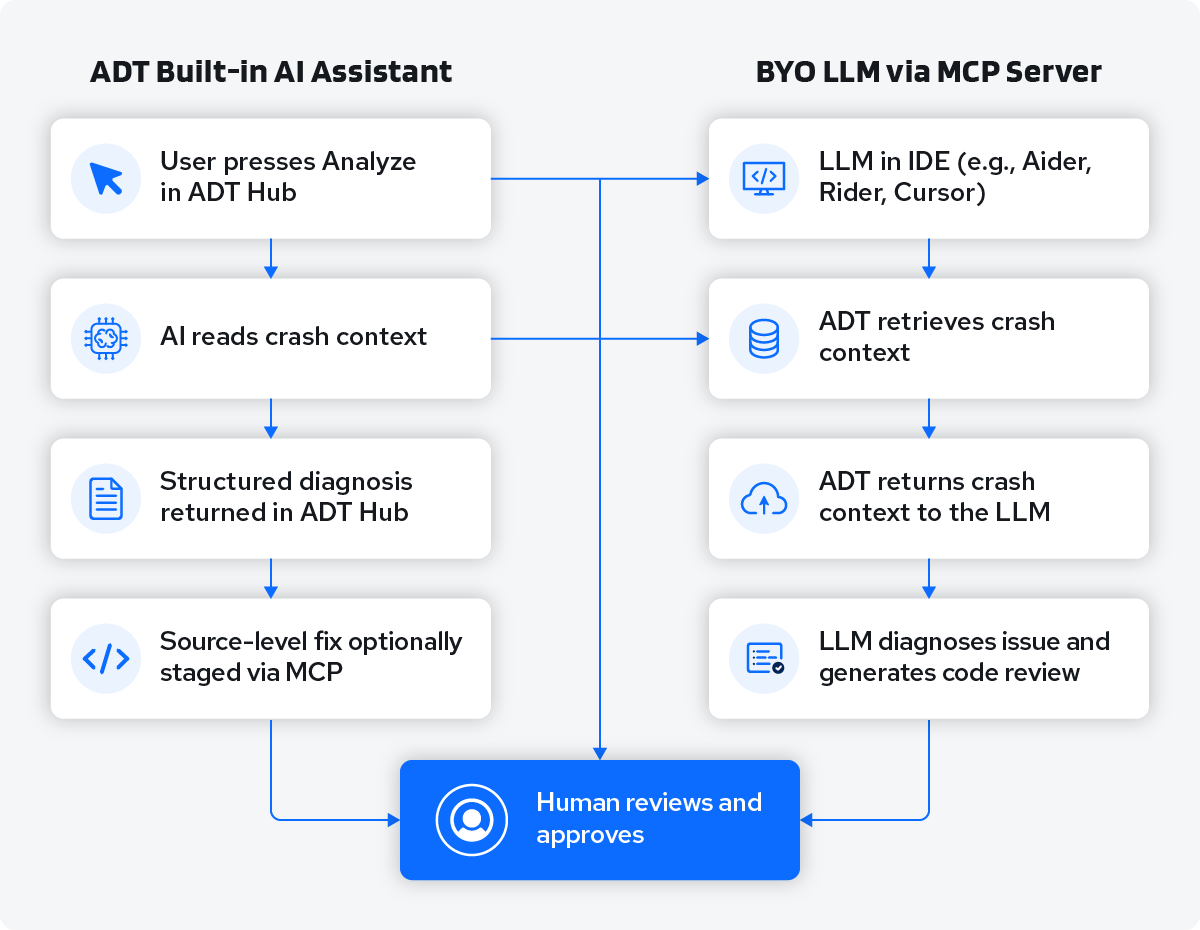 Path 1: ADT's Built-in AI Assistant
ADT ships with an AI assistant built directly into the Hub without requiring a separate LLM setup. When a crash lands in ADT, an engineer presses Analyze and the assistant takes over.
It works through several steps automatically:
-
Reads the symbolicated call stack and identifies the frames most likely related to game code.
-
Cross-references the crash against historical data to determine whether this crash has appeared in previous builds, when it first showed up, and whether it's platform-specific.
-
Returns a structured response: a likely root cause hypothesis, the reasoning behind it, references to similar crashes in other builds, and a suggested fix direction.
For teams that connect their source repository via MCP, the assistant can go further and identify the specific file and line number responsible, retrieving the surrounding source code, and in simple cases (a missing null check, an unguarded pointer dereference) staging a fix as a local commit for the engineer to review. The fix never leaves the developer's machine until they decide to push it upstream.
This path is designed for teams that want AI-assisted crash analysis with minimal setup overhead. It works inside ADT Hub without touching any external configuration.
Path 2: Your Own LLM via ADT's MCP Server
For teams that already have an LLM configured in their IDE like Rider, Cursor, and VS Code, AccelByte's MCP server for ADT lets that LLM pull structured crash context directly from ADT. The IDE becomes the interface; ADT becomes the data source.
This is the path SDS took, and the rest of this post covers how it works in practice.
The MCP server architecture that makes this possible is explained in more depth here: AccelByte's MCP servers give AI assistants real backend context.
How ADT MCP Server Powered SDS's Crash Pipeline
SDS standardized on JetBrains Rider as their IDE, and every engineer runs ADT. When a crash comes in that an engineer wants to investigate, the workflow runs like this:
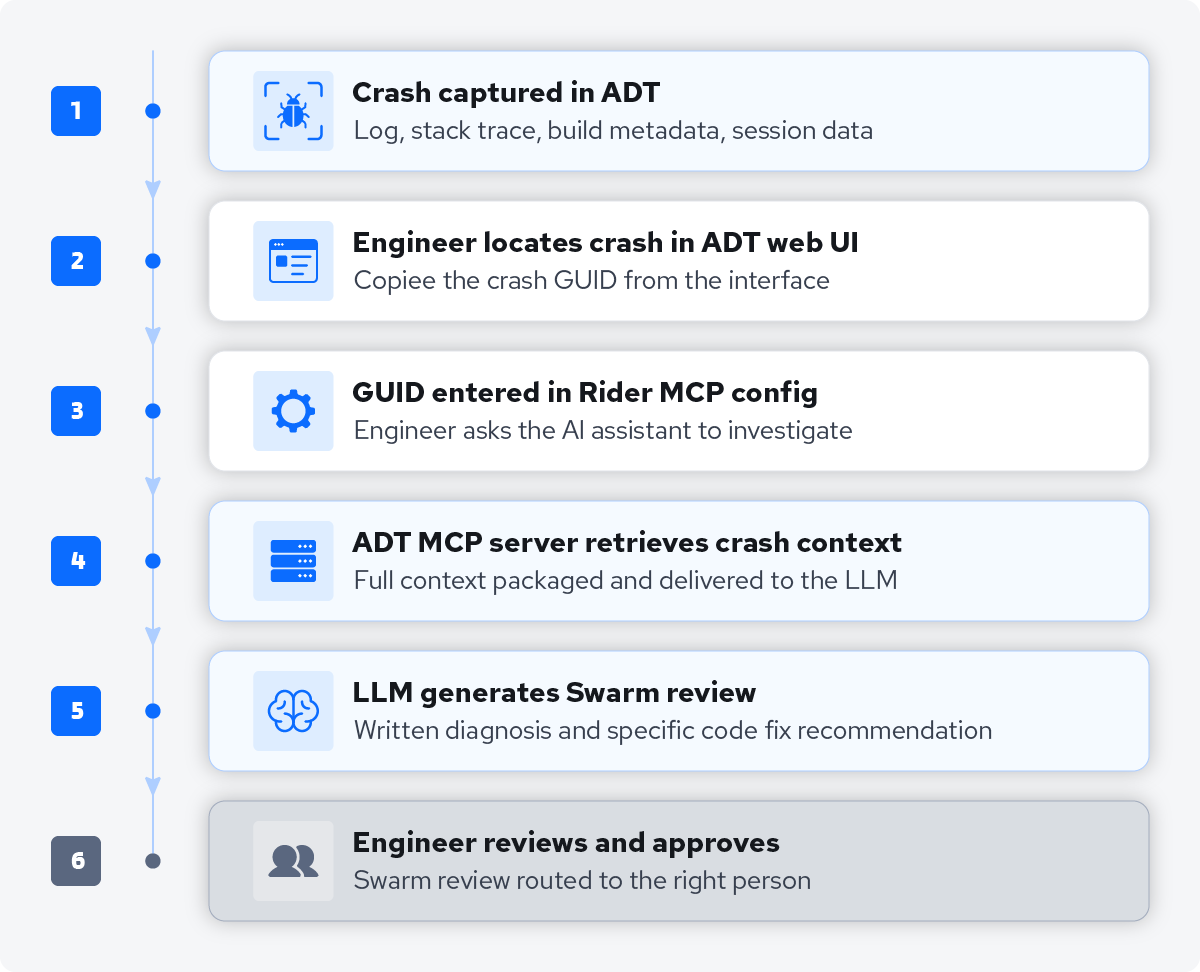 And here’s how the division of responsibility between ADT and the LLM looks like:
|
AccelByte ADT (MCP Server) |
LLM in JetBrains Rider |
|
Instantly captures all relevant data during a game crash |
Reads the log file, stack trace, and crash context |
|
Categorizes crashes by build, platform, and session |
Identifies the probable root cause |
|
Retrieves specific crash and all its context on request |
Proposes a specific code fix |
|
Packages context for the LLM via the MCP interface |
Writes Swarm review with diagnosis & fix suggestions |
ADT is the data and context layer. The LLM is the reasoning layer. Because the two are connected through a standard MCP interface, the workflow isn't locked to a specific model, SDS uses GPT-4 through their parent company's tooling, and it connects the same way any other model would.
A Concrete Example: The Automated Test Build Crash
Here's how this workflow plays out in a daily build scenario.
-
Automated nightly tests capture crashes in ADT.
-
Engineers later provide crash GUIDs from ADT to the AI in Rider for investigation.
-
The AI quickly generates a Swarm review with a diagnosis and fix.
-
Engineers approve recommendations, cutting at least 2 hours of work down to a brief verification.
Jordan Yerkes, the engineer leading crash reporting at SDS, described a real version of this:
"We've got these low priority debug crashes that no one's going to look at for weeks. Now, we could just have a fix in 20 minutes. Someone just has to open up a Swarm review, take a quick look."
The AI-proposed fixes are generally high-quality but not perfect. In one instance, an LLM suggested unnecessary pointer conversions when a weak lambda was the simpler solution. Jordan notes that imperfect results can be refined or re-analyzed, but the AI consistently offers a robust starting point for reviews rather than requiring a draft from scratch.
What This Did for SDS’s Triage Pipeline
-
Resolution time dropped from at least 2 hours to 20 minutes.
Jordan Yerkes, the lead engineer for crash reporting at SDS, estimated this impact based on months of production data rather than a sterile benchmark: "Maybe 2 hours to 20 minutes". For a team managing a constant influx of crashes in a large-scale Unreal Engine project, this reduction in time adds up rapidly.
To illustrate the impact: triaging five crashes daily previously occupied nearly an entire workday; now, it takes less than two hours. This efficiency allows engineers to redirect their time toward active development rather than analysis.
-
QA can now initiate crash analysis without an engineer in the loop.
Before this workflow, resolving a crash wasn't always a one-person task. An engineer would investigate, QA might be called in to reproduce the issue, and for higher-priority crashes a producer might get involved in coordination and prioritization. Every handoff added delay.
Now, a QA team member can kick off the analysis job, receive a fix recommendation, and route the Swarm review to the right engineer for approval. The investigation and diagnosis happen automatically. The chain that previously ran through multiple people now runs through one, with a human signing off at the end. Instead of QA spending hours reproducing crashes to give engineers enough context to investigate, they're routing ready-to-review fix recommendations.
-
Backlog crashes get a fix surfaced the same day
The AI is most effective in the category of crashes that would never get scheduled under the old model — low-severity issues, debug crashes, edge cases that don't rise to the level of "someone needs to fix this today." These are the crashes that accumulate into technical debt.
With this workflow, a crash that would have sat in the queue for weeks gets a fix recommendation in 20 minutes. The engineer still reviews and approves. But the investigation work is done.
What SDS's Workflow Revealed and Where We Are Taking It
Running this workflow in production surfaced three specific gaps and we are actively working on removing those frictions. These aren't theoretical and are directly shaping what AccelByte builds into ADT next.
-
GUID copying is still manual.
Every job starts with an engineer copying a crash GUID from the ADT web interface and pasting it into Rider. It's a small step, but it's a manual initiation requirement on every single triage job. The goal is to remove it entirely through natural language querying so an engineer can just ask their IDE "what crashed in my last build?" and ADT returns the right crash in context.
To clarify, this is only the case when studios use the MCP server and custom LLM. Studios that use ADT’s in-built AI assistant can already use natural language to query and debug. -
No Slack notification routing.
SDS wants crash fix recommendations to automatically ping the right engineer in Slack when a Swarm review is created. Right now, Jordan routes reviews to people manually. The Slack integration is planned but not yet in place.
-
No deduplication.
If the same crash gets analyzed three times, three Swarm reviews get created. There's no logic to detect that a crash is already in progress or has already been reviewed.
Where we are taking this: shelved fixes with confidence scoring
Beyond closing these gaps, the more significant direction is pre-staged fixes with confidence scoring.
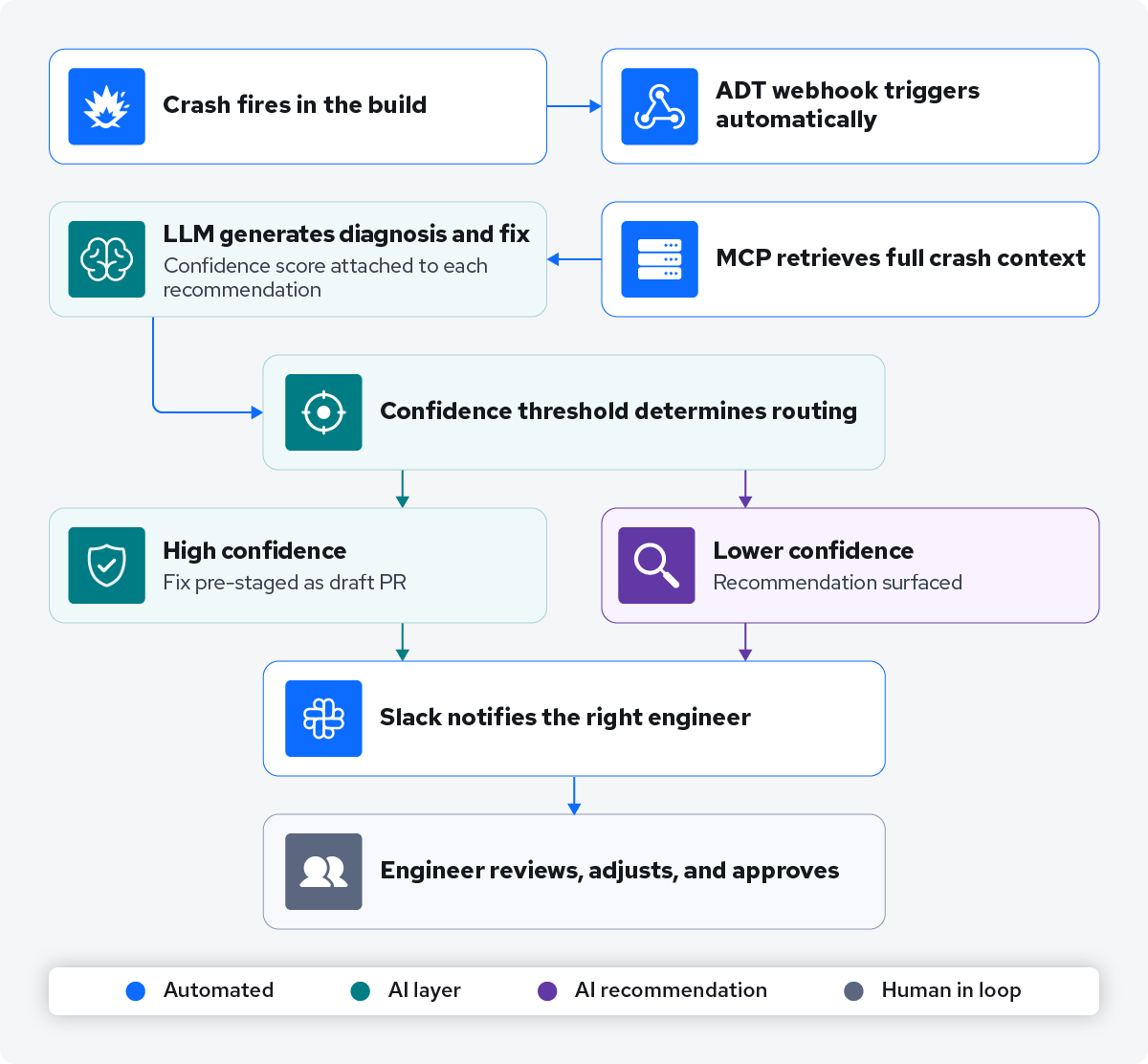
The ADT built-in AI assistant can already stage a simple fix as a local commit for engineer review. The logical next step for the MCP-connected workflow is similar: when the LLM produces a fix recommendation, attach a confidence score based on the quality of the match between the root cause hypothesis and the proposed code change. High-confidence fixes (straightforward null checks, simple scope errors, pattern-matched regressions) could be automatically shelved as a draft PR or change request. Lower-confidence cases surface as recommendations without auto-staging.
This makes the human review step more efficient too. Instead of evaluating every recommendation from scratch, engineers can triage by confidence. When these pieces are in place, the workflow looks like this:
 The engineer shows up to a fix that is ready to review, not a log that needs to be read.
What This Means for Your Engineering Pipeline
The SDS workflow has been running in production for several months with four to five engineers using it regularly. The time savings are real and measurable. The QA empowerment isn't a side effect, it's the most significant structural change in how the team handles crash resolution.
For teams thinking about whether this fits their pipeline: the ADT built-in AI assistant and the MCP server approach are not mutually exclusive. Studios can use the built-in assistant for individual crash investigation inside ADT Hub, and use the MCP server to bring that same crash context into their IDE's AI for deeper source-level analysis, code generation, and review submission.
AccelByte has been applying a similar approach — AI with real backend context — to cut SDK development time from months to days using Codegen AI, our internal tool. Learn more about it.
For QA teams specifically: when crash triage drops to 20 minutes and QA can route fix recommendations without waiting on an engineer to investigate first, the scope of what QA can own in the fix pipeline expands. You are not just capturing and reproducing crashes. You are closing them.
Get Started for Free with ADT
The AccelByte Development Toolkit includes crash reporting with AI-assisted analysis, build distribution through Smart Builds, and playtesting tools — all in one platform. It comes with a 30-day free trial so your team can run the crash pipeline in your own environment before committing.
If you want to see how an AI-assisted crash workflow could work for your specific pipeline and toolchain, talk to us and we can walk through what the setup would look like for your team
Featured Blog Posts



Bring your first player online today.
Get started for free, and scale as your game grows.