


Some matches are meant for a specific group of players, and nobody else.
In Byte Wars, our sample multiplayer game, a custom match host had two ways to choose who could join, and neither one fit that case. An open match appears in the Browse Matches list, and anyone who finds it can join. An invite-only match keeps strangers out, but the host has to invite every player one at a time. That is slow for a community night or a scrim, where the group already shares a chat and only needs a way in.
What the host wants is a shared secret. They post a password in the group’s chat, and anyone who knows it can pick the match from the list and join. Everyone else sees the match but cannot get in.
AccelByte Gaming Services (AGS) supports this through PASSWORD_PROTECTED join ability on game sessions. The missing work was on the client side: let the host set a password, then ask a player for it when they join from the match list.
Here is how we wired that into Byte Wars with AccelByte Online Subsystem (OSS) in Unreal Engine, including the backend rules and the edge cases that were easiest to miss.
See the Difference in Byte Wars
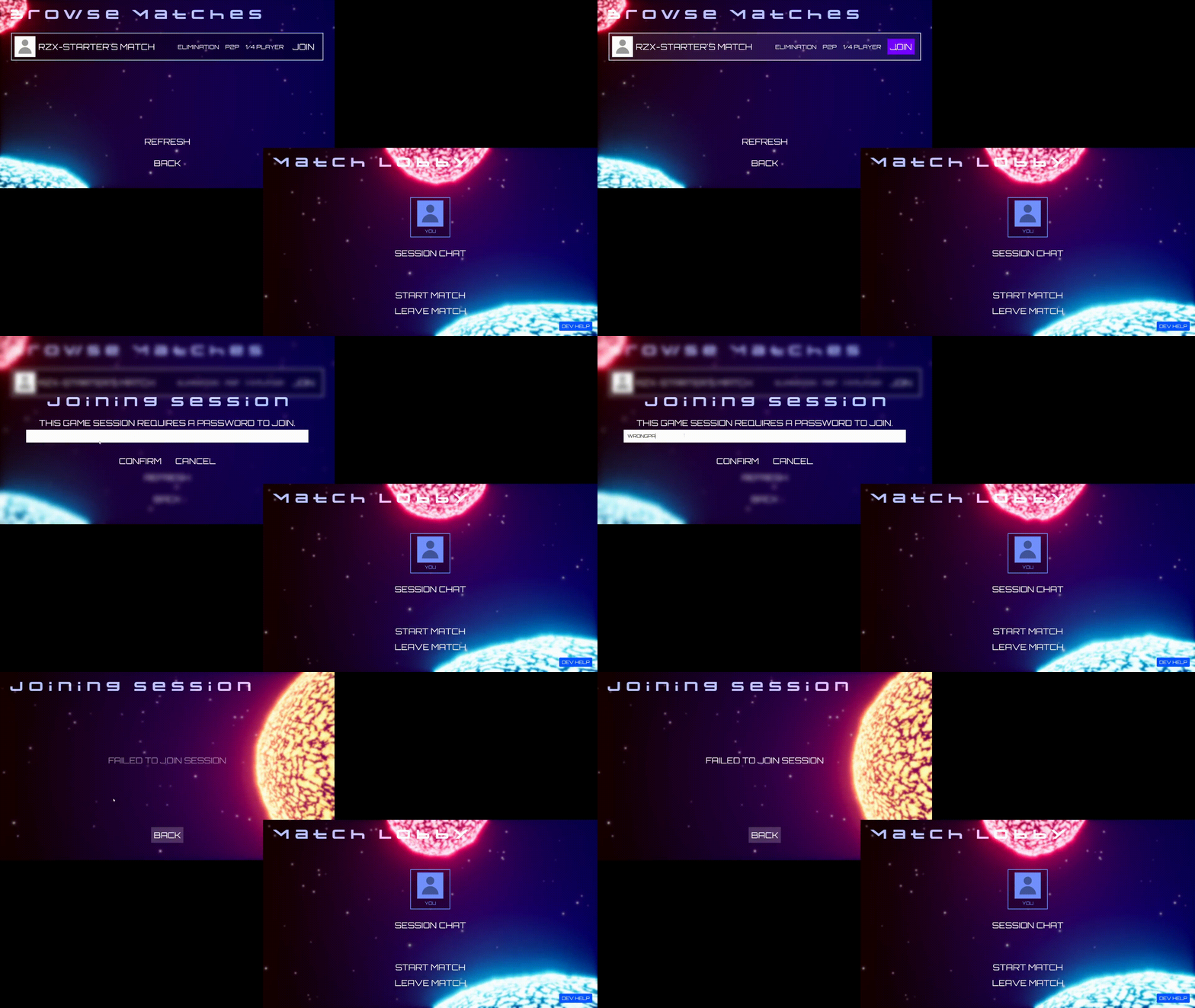
Both recordings start from Browse Matches. The first shows an open match, where a player joins without another step. The second shows the password-protected version, where the player has to enter the shared password before joining.
Before: open session. 
After: password-protected session.
This is access control, not session hiding: the protected match can still appear in the match list. The password controls who can enter through that join path.
What the Password Actually Protects
The session service does not check the password on every way of joining. The rule is short: an invite is already authorization, and the password is for everyone else.
In Byte Wars, the first case is a player joining from Browse Matches. That is where we put the password prompt. A player accepting an invitation should not see it, because the backend already lets invited players in.
Before You Start
Byte Wars routes session management through one runtime UOnlineSession-derived class. The code below calls the AccelByte session and identity interfaces directly, so the flow is the same if your project organizes its session code differently.
You will need a signed-in player with a valid local user ID, working session creation and discovery, and an AGS/Unreal OSS version that supports password-protected sessions. You will also need password encryption configured for the session service; we cover the error you get when it is missing below.
Get the Session and Identity Interfaces
Start by resolving the session interface, identity interface, and local player ID used by session calls:
#include "OnlineSubsystemUtils.h"
#include "OnlineSessionInterfaceV2AccelByte.h"
#include "OnlineIdentityInterfaceAccelByte.h"

FOnlineSessionV2AccelBytePtr SessionInterface =
    StaticCastSharedPtr<FOnlineSessionV2AccelByte>(Online::GetSessionInterface(World));
FOnlineIdentityAccelBytePtr IdentityInterface =
    StaticCastSharedPtr<FOnlineIdentityAccelByte>(Online::GetIdentityInterface(World));
FUniqueNetIdPtr LocalUserId = IdentityInterface->GetUniquePlayerId(LocalUserNum);
Everything that follows assumes the player is logged in and those interfaces are valid.
Host Flow: Create a Password-Protected Match
A password is useful when the group already has a way to talk. A streamer can post it in a community chat for a viewer match. A team can pin it in Discord for weekly practice. The host shares the password once instead of inviting everyone individually.
To create a protected custom match, add two settings to those you already pass to CreateSession: the joinability type and the password.
FOnlineSessionSettings SessionSettings;
// ... your usual session template and match settings ...
SessionSettings.Set(
    SETTING_SESSION_JOIN_TYPE,
    UEnum::GetValueAsString(EAccelByteV2SessionJoinability::PASSWORD_PROTECTED));
SessionSettings.Set(SETTING_SESSION_PASSWORD, Password);

SessionInterface->CreateSession(*LocalUserId, NAME_GameSession, SessionSettings);
The OSS moves SETTING_SESSION_PASSWORD into the request’s password field. It does not put the password in the session attributes returned with the match listing.
Note: You don't need to configure SESSION_PASSWORD_ENCRYPTION_KEY yourself when using AccelByte Public Cloud. If you encounter an error related to this key while creating a password-protected session, reach out to us.
Changing the Password
The host can replace the password on an existing protected game session with UpdateGameSessionPassword:
SessionInterface->UpdateGameSessionPassword(
    *LocalUserId,
    NAME_GameSession,
    NewPassword,
    FOnUpdateGameSessionPasswordComplete::CreateLambda(
        [](bool bWasSuccessful)
        {
            // Players already in the session stay.
            // Later joins need the new password.
        }));
Player Flow: Join a Protected Match
The joining side has one job: notice that a session requires a password, ask the player for it, and send it with the join request. The plain JoinSession call has no password parameter. Calling it on a protected match from Browse Matches fails with 97012 PasswordRequired.
1. Detect Protected Sessions in the Match List
Each search result carries the joinability type in SETTING_SESSION_JOIN_TYPE. We read that setting directly to decide whether to open the prompt:
FString JoinTypeString;
SearchResult.Session.SessionSettings.Get(SETTING_SESSION_JOIN_TYPE, JoinTypeString);

const UEnum* JoinabilityEnum = StaticEnum<EAccelByteV2SessionJoinability>();
const bool bIsPasswordProtected = JoinabilityEnum &&
    JoinabilityEnum->GetValueByNameString(JoinTypeString) ==
        static_cast<int64>(EAccelByteV2SessionJoinability::PASSWORD_PROTECTED);
The OSS fills this setting for sessions it receives from the backend, so the check works directly on match-list results.
2. Prompt the Player and Join
If the match is protected, ask the player for the password. Then use the JoinSession overload that accepts it:
SessionInterface->JoinSession(*LocalUserId, NAME_GameSession, SearchResult, Password);For open matches, keep using the plain join call. Both paths report their result through the normal OnJoinSessionCompleteDelegates callback.
The flow below shows where the password prompt belongs. Notice that Cancel clears the saved join state rather than issuing a join request.
Match-list join flow (adapted from the original Byte Wars implementation diagram).
3. Handle Blueprint Password Prompts
Our password prompt is a Blueprint widget, so its callback is a dynamic delegate:
DECLARE_DYNAMIC_DELEGATE_TwoParams(
    FOnPasswordEntrySubmit, const FString&, InputText, bool, bWasSubmitted);
A dynamic delegate binds only to a UFUNCTION through BindDynamic. It cannot bind a lambda, so we cannot capture the selected search result in a closure. Instead, we store it on the object before opening the prompt and read it back in the callback.
Fire the callback on every exit, including Cancel. Otherwise, cancelling can leave stale join state behind. The bWasSubmitted parameter handles this: the widget fires the callback exactly once when it closes, and the handler clears saved state before it checks whether the player confirmed.
If your prompt is native C++ UI, a regular delegate with a lambda avoids that bookkeeping.
What Happens When a Password Is Wrong?
This was the one result our existing error handling did not explain very well. The backend rejects an incorrect password with HTTP 403 and 97013 invalid password, but the OSS does not pass that code to the join delegate. It reports EOnJoinSessionCompleteResult::UnknownError, just as it does for other unexpected failures.
SessionInterface->OnJoinSessionCompleteDelegates.AddLambda(
    [](FName SessionName, EOnJoinSessionCompleteResult::Type Result)
    {
        // A wrong password arrives as UnknownError,
        // not as a password-specific result.
    });
The specific code still appears in the OSS logs, which is useful when debugging. Missing passwords (97012) and blocked join-by-code attempts (20080) also reach game code as UnknownError in this flow.
Byte Wars currently keeps its generic “Failed to join” message. A game can do better when it knows the player just entered a password. For example: “Could not join. Check the password and try again.” That does not assume every UnknownError is definitely a bad password.
A Note on Party Sessions
Party sessions support the same PASSWORD_PROTECTED joinability. The same rules apply: joining by party ID from a player who is not invited needs the password, invited players skip the check, and join by code is rejected.
Byte Wars players join parties through friend invites and party codes, so a party password has nothing to protect in our sample, and we left it out. If your game lets players discover a party and join by ID, the join snippets above work for parties too: pass NAME_PartySession and the party’s search result.
To protect an existing party, include the joinability change and the password together in one UpdateSession call. The backend rejects a change to PASSWORD_PROTECTED that arrives without a password.
Wrapping Up
In Byte Wars, most of the work was putting the prompt on the right join path.
PASSWORD_PROTECTED joinability gave custom match hosts a shared-password gate without one-by-one invites. On the player side, one joinability check and the password-aware JoinSession overload covered Browse Matches, which is the path where the password matters in our implementation. Invites skip the password by design, and join by code is not available for protected sessions.
The examples use Unreal Engine and AccelByte OSS, but password-protected joinability belongs to the session service rather than Unreal itself. Games integrating AGS through another supported SDK can build the same player experience with that SDK’s session APIs.
Resources and Source Code
Build Multiplayer Features Without Starting From Scratch
From password-protected custom matches to matchmaking and dedicated servers, AccelByte gives you the backend services you need to build and scale multiplayer games. Get started with AccelByte Public Cloud, free during development for up to 30 concurrent users (CCU). Need custom backend functionality? Try AccelByte Extend free for 90 days to host and run your own game logic without managing the infrastructure.
You're almost signed up!
Verify your account by following the instructions sent to .
If you still haven't received an email, please check your spam folder.
Featured Blog Posts

Bring your first player online today.
Get started for free, and scale as your game grows.