


Some of the work that lands on a live game’s support team has nothing to do with the game. A player who signed in through Steam two years ago wants a copy of their data. A producer wants to know why this month’s bill is higher than last month’s. Neither request is hard, but both tend to turn into tickets, and the privacy one comes with a legal deadline.
This cycle took on both. Players with platform-only accounts in AccelByte Gaming Services (AGS) can now handle their own privacy requests, and the Usage page now shows how every charge was calculated. On Private Cloud, P2P relay capacity also moves off your plate: AccelByte manages it now. After that you’ll find the rest of what shipped in AGS 2026.5.2 and three AGS CLI releases. If you missed last month’s roundup, the September update covered PC device bans and server-side leaderboard filtering.
Platform-Only Players Can Handle Their Own Privacy Requests
Why These Requests Turned into Tickets
Most of your players have probably never typed a password into your game. They sign in through Steam, PlayStation, or Xbox and start playing. AGS calls this a headless account, and it’s the most common kind. There’s no email address or password on it, and the only way to prove you own one is to sign in through the platform it’s linked to.
That works fine right up until one of those players asks for their data. The privacy request flow checked identity with a password, which a headless account doesn’t have, so the request went to support. Someone had to confirm the person writing in actually owned that Steam account, file the request by hand in the Admin Portal, and then work out how to get an export file to a player with no email address on record. GDPR gives you one month to respond, and that clock started the moment the player asked.
How Platform-Only Privacy Requests Work
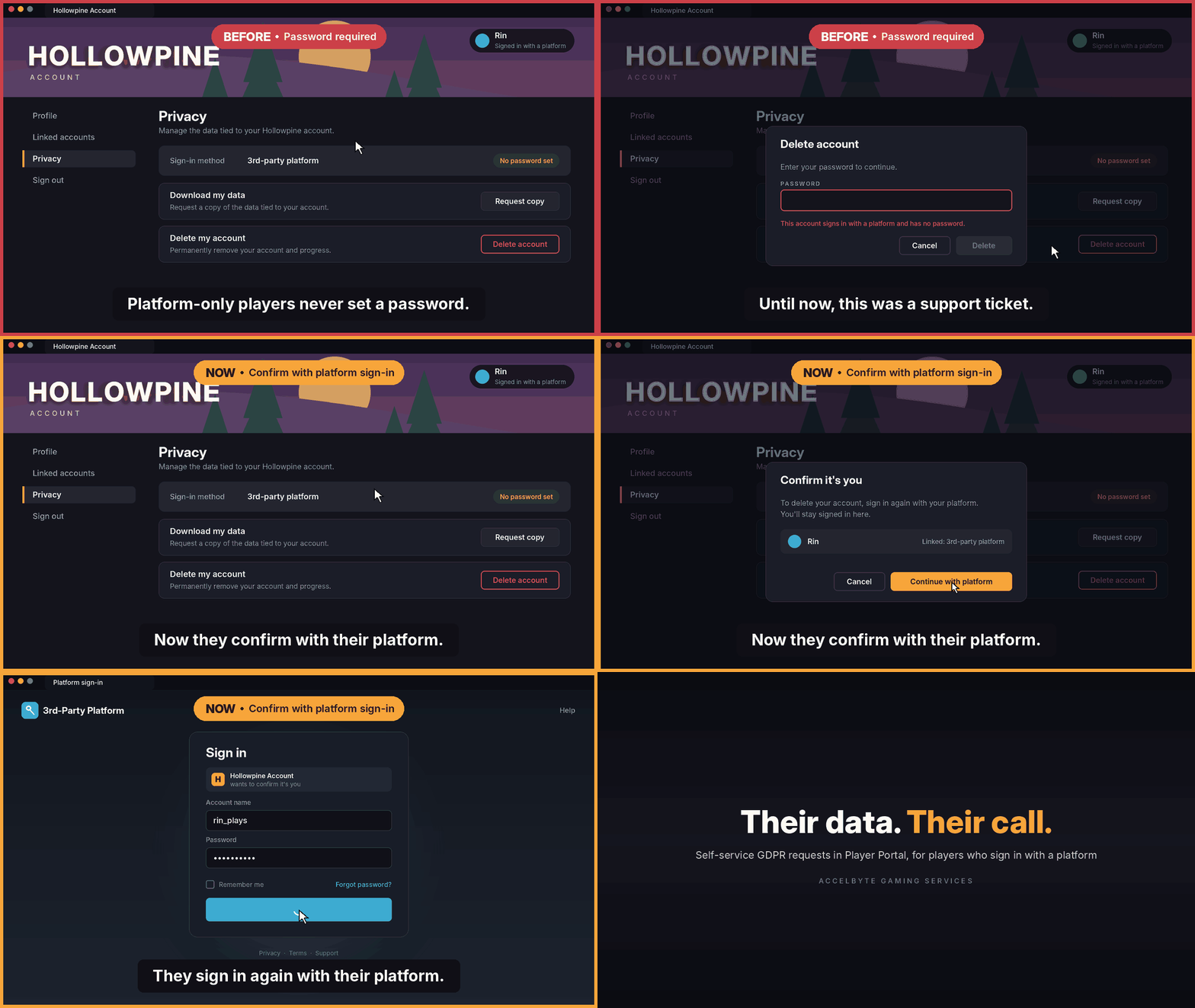
Players now prove the account is theirs the same way they created it: by signing in again through their platform. No email, no password.
In Player Portal, a player can request a copy of their data or delete their account, re-authenticate with their Steam or console account to confirm, and stay signed in while the request runs. Player Portal is available on Private Cloud.
 In your game, a new SDK method lets players request their data using the platform auth ticket the client already has. It pairs with the in-game account deletion AGS already supported. The player enters an email address, AGS prepares the export in the background, and the download link arrives in their inbox. That email address isn’t saved to the player’s account.
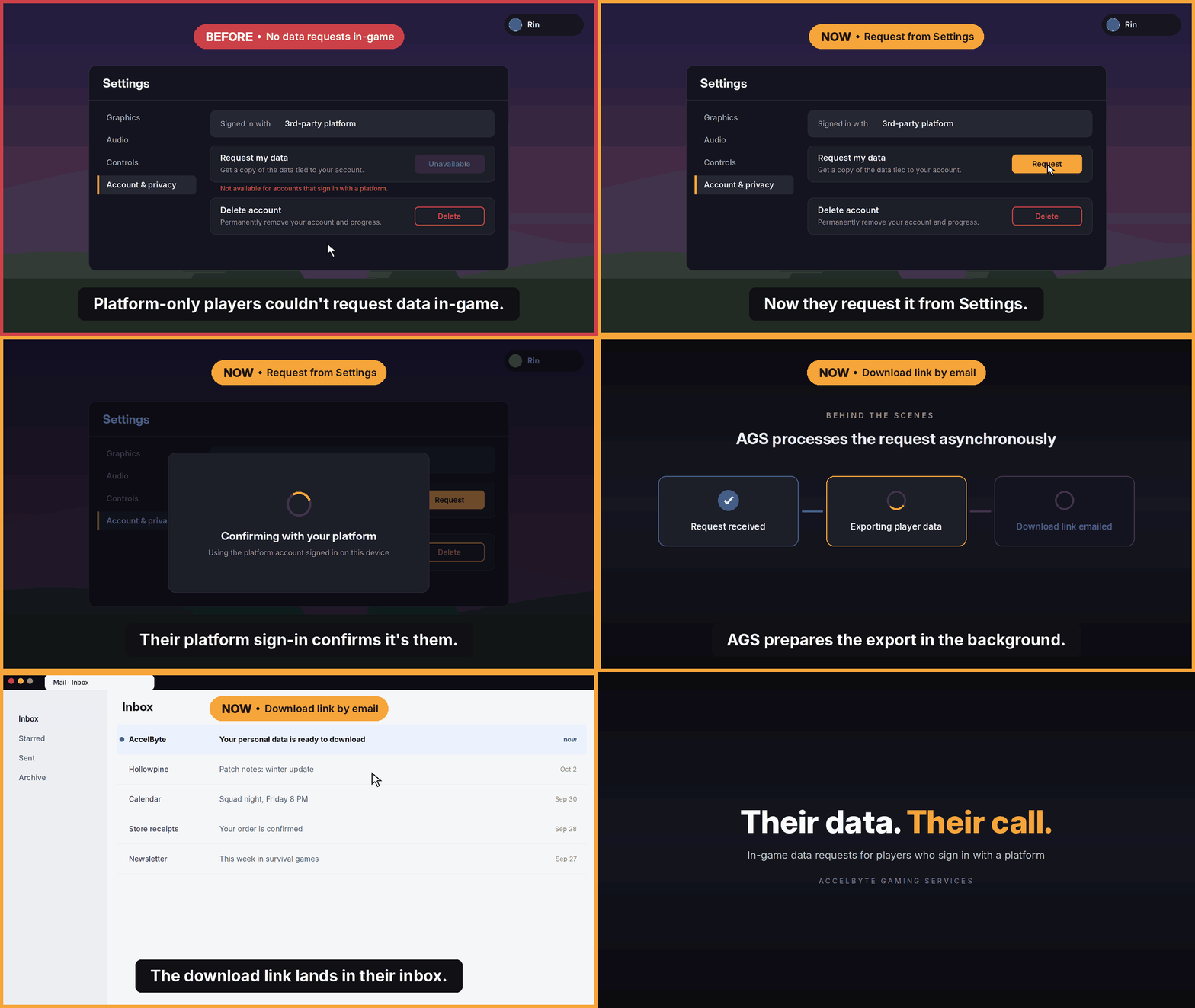 Two checks keep a stolen session from doing damage. Deletion always asks for a fresh platform sign-in, while a data request only asks again if the last sign-in wasn’t recent. And the platform account used to confirm has to match the one linked to the player’s AGS account.
Before You Turn It On
A few things worth knowing first:
-
Player Portal needs nothing from you.
On Private Cloud, headless players get the new flow automatically. -
In-game data requests need an SDK update.
Move to the latest SDK version and call the new method. -
Decide whether you want to collect an email.
The in-game flow asks for one to send the download link. On Private Cloud, you can skip the SDK update and point players to Player Portal instead, where they download the export in the browser. -
Login bans still go through support.
A player with a login ban can’t sign in, so they can’t re-authenticate. Those requests still reach your team.
This doesn’t take privacy requests out of your process. You’re still responsible for answering them, and for the player data your own services keep outside AGS (the GDPR implementation guide covers wiring custom services in). What it removes is the manual step in the common case: a player who can prove who they are no longer has to wait on you to do it.
The Usage Page Now Shows Its Math
What the Old Page Left Out
The old Usage page told you what you owed but not how it got there. Extend showed hours and gigabytes, then a dollar figure, with no rate in between. A blank could mean no usage or a panel that was still loading. And one generic free-trial banner covered three products whose free allowances work differently.
None of that changed the bill. It changed whether you could check it, and a bill you can’t check is the one that turns into a support ticket at the end of the month.
What You’ll See Now
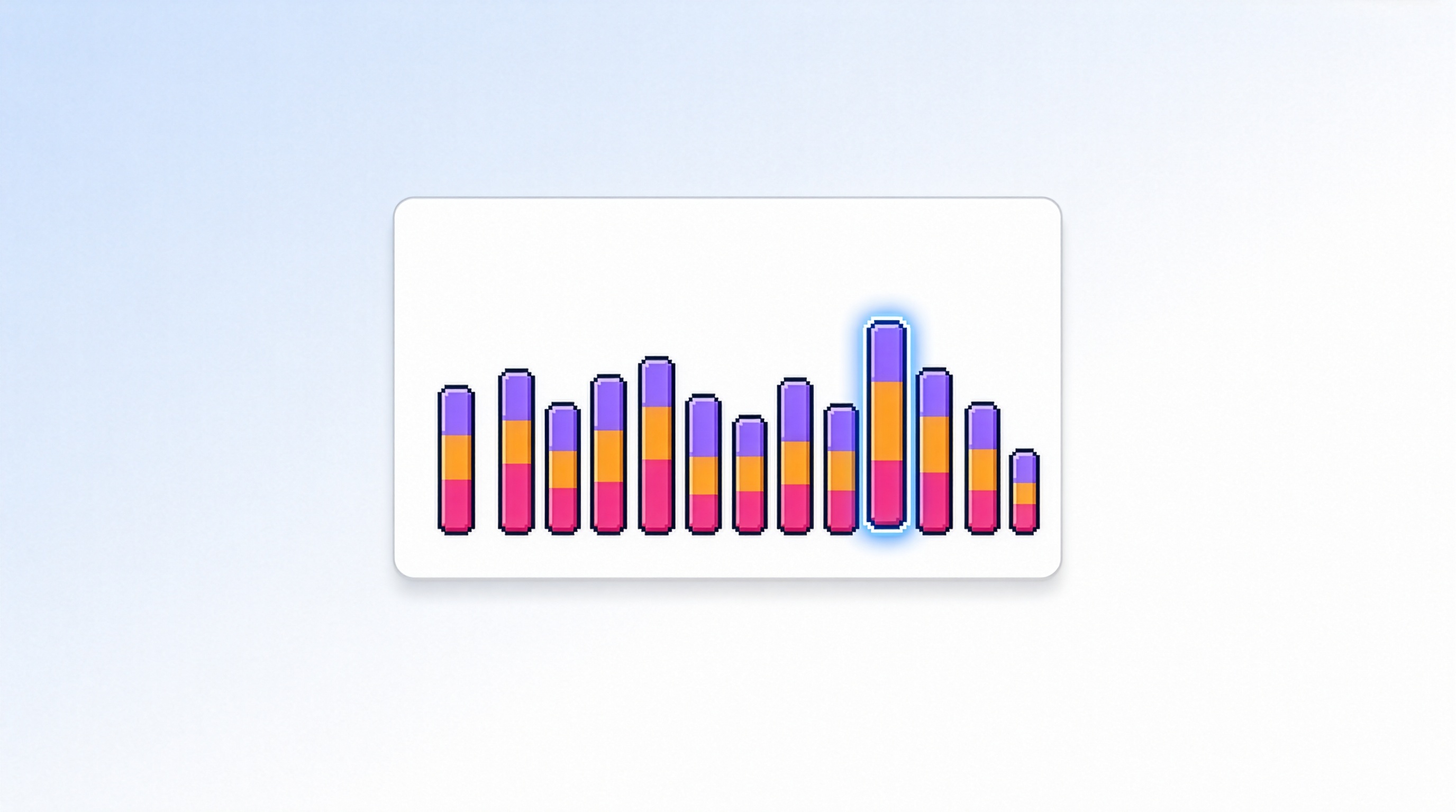
The page opens with your month-to-date usage cost, the invoice status, and cost per monthly active user. A daily chart shows cost across AGS, Extend, and Multiplayer Servers, with the free and paid parts drawn differently, and hovering a day breaks it down by product.
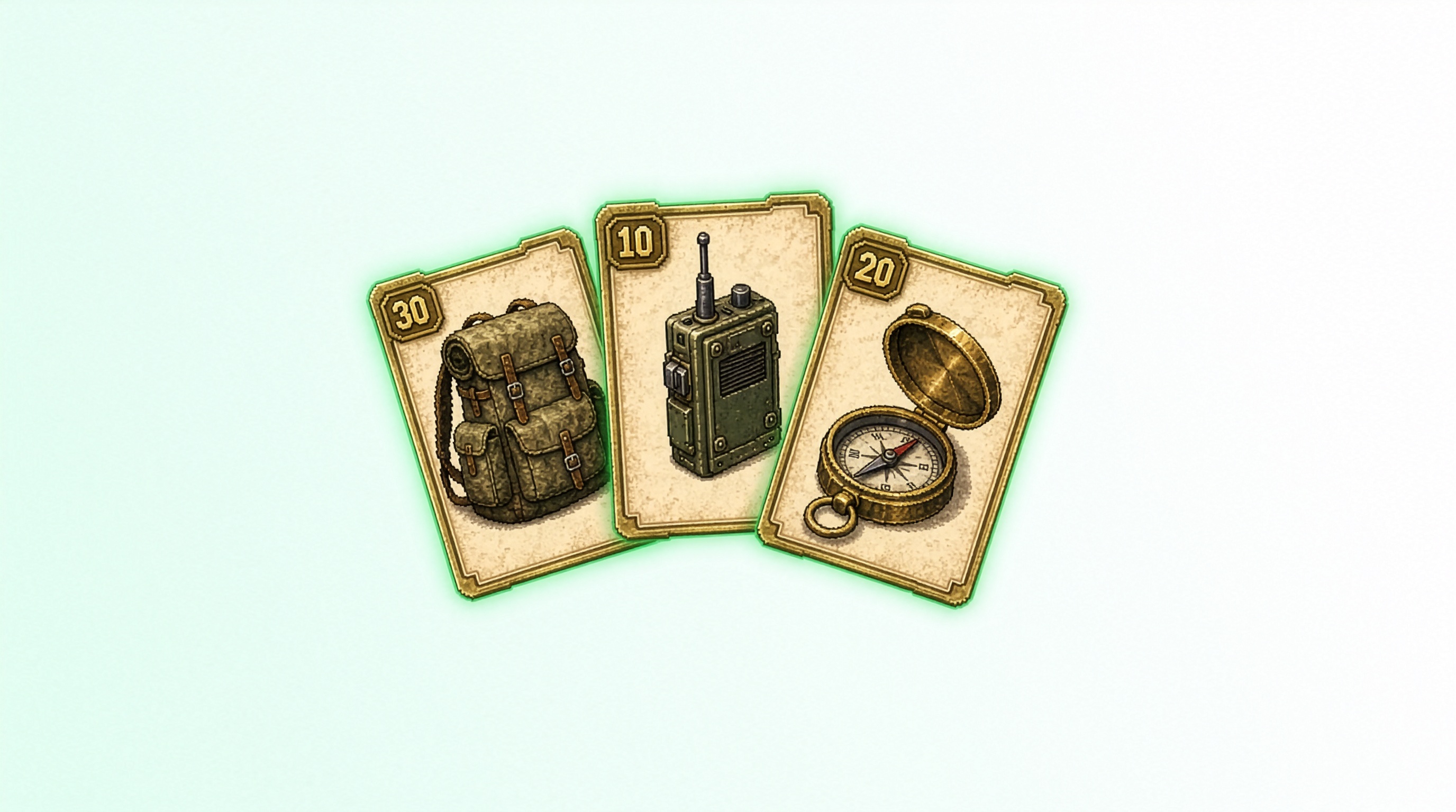
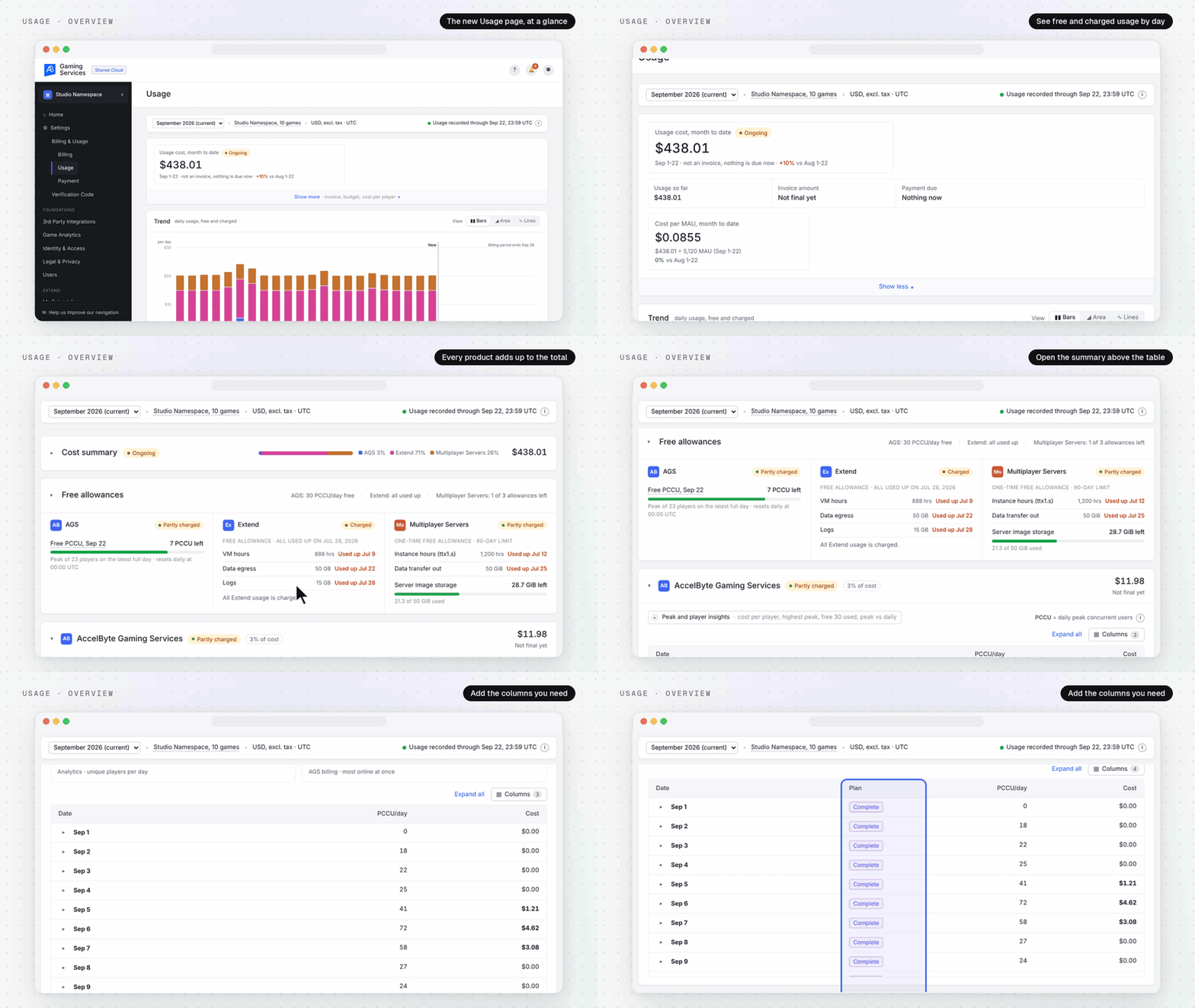 Every charge expands. For AGS, that’s one row per day with peak concurrent users (PCCU) split by pricing tier, and the first 30 PCCU each day are free. Say your game peaked at 41 PCCU on Tuesday. The row shows 30 covered by the free allowance and 11 charged at your plan’s tier rates, and you can follow those amounts through to the day’s total. Extend and Multiplayer Servers break down by region or fleet.
Allowance cards sit next to the chart, one per product, showing what’s left, when each metric ran out, and whether you’re on Free, Partly paid, Paid, or No usage. That matters because the allowances aren’t alike: AGS gets 30 free PCCU every day, while Extend and Multiplayer Servers have one-time allowances.
How the Numbers Stay Honest
A few decisions behind the page are worth knowing if you’re the one reconciling the invoice:
-
Loading, zero, and ongoing are different states.
A panel that’s still loading shows a skeleton, not $0.00. A day with no usage shows 0 PCCU and $0.00. A month-to-date amount is marked Ongoing until the invoice is issued, then Invoiced with a link to it. -
The backend does the math.
The page shows charges and sums exactly as the billing service returns them instead of re-adding rounded numbers in the browser, so table totals match product subtotals and the summary matches the total. -
Small numbers stay visible.
0.0002 GB of data transfer shows as 0.0002 GB, not 0.00 GB.
The page covers product usage only. Taxes and support plans aren’t in these numbers, and the page says so.
Availability: Public Cloud, from AGS 2026.5.3. Open it in the Admin Portal under Settings → Billing & Usage → Usage, with nothing to set up.
P2P Relay Capacity Is Now Managed for You
Why Relay Sizing Was Easy to Get Wrong
Peer-to-peer is the simplest way to host a session: one player hosts, the others connect, and there’s no dedicated server to deploy. Most of the time players connect directly. When a firewall or NAT gets in the way, AGS falls back to a TURN relay so the match still happens.
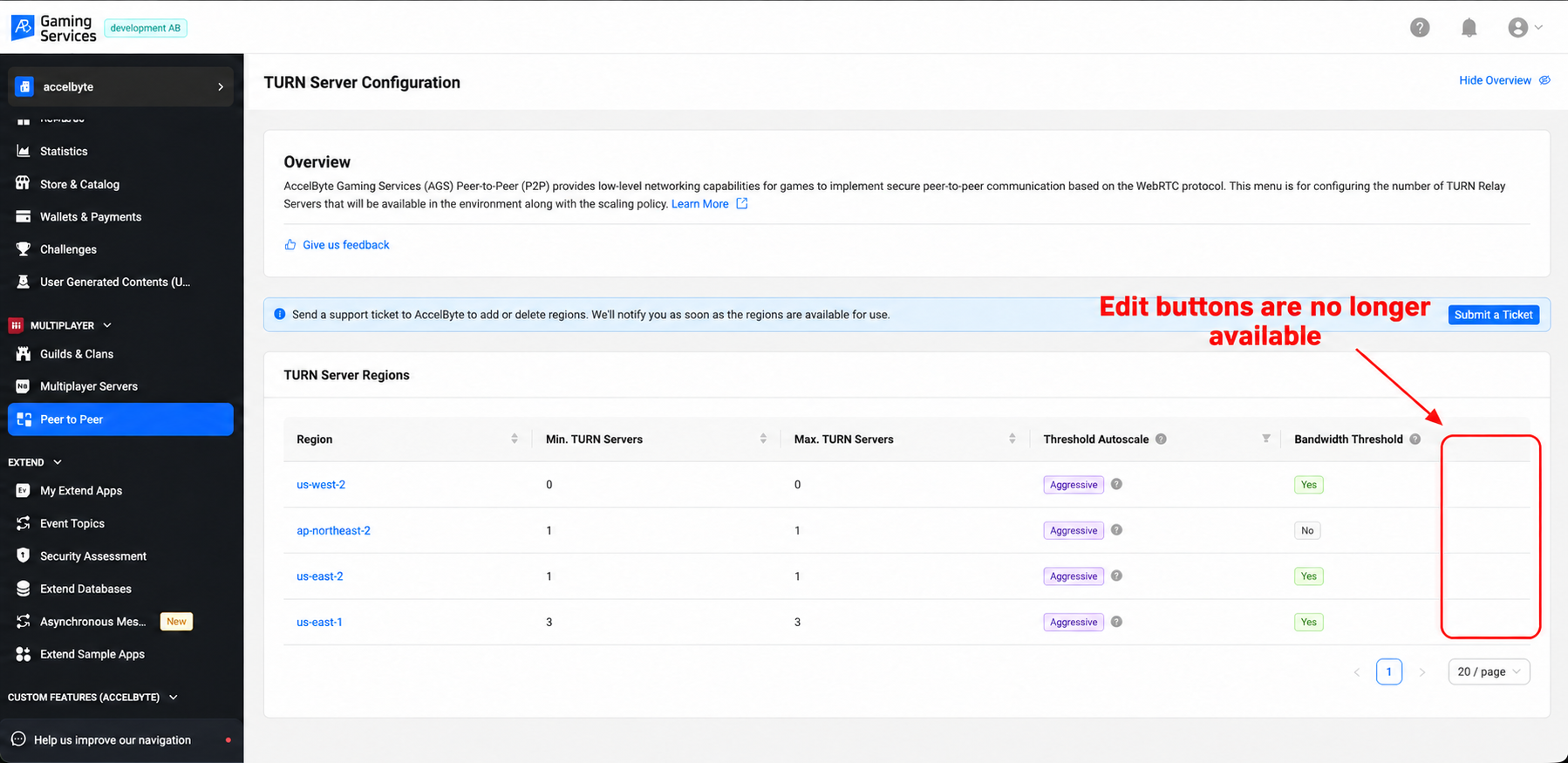
That relay is infrastructure, and on Private Cloud it used to be yours to size. For each region you set a minimum and maximum number of relay servers, an autoscale policy, and whether bandwidth should trigger scaling. Set the ceiling too low and a launch-week spike can outgrow it in the one region where your players are. Set a region’s maximum to zero and nobody there can relay at all. Both are easy to miss until players report they couldn’t join.
What Changes in AGS 2026.06
Starting with AGS 2026.06, AccelByte manages relay capacity in every environment. Public Cloud always worked this way, and Private Cloud now matches it.
The TURN Server Configuration page and your region list stay where they are in the Admin Portal, under Peer to Peer. The per-region autoscale settings become read-only, and every value your environment uses today carries over, so nothing changes for your players on release day.
-
No capacity planning.
AccelByte sizes and tunes relay capacity from how your game is actually used, and reviews it regularly. -
Settings are checked before they apply.
Scaling floors, ceilings, and thresholds are validated, so an environment can’t be left with a setting that never scales up or never scales back. -
No change in cost.
Relay stays included in your AGS subscription at no additional charge, on Public Cloud and Private Cloud. -
Same regions.
Your active relay regions aren’t touched by this release.
Need Something Changed?
The trade-off is control: you can’t change the scaling values yourself anymore. If you need a relay region turned on for a launch, or think your environment needs a different capacity profile, use Submit a Ticket on the TURN Server Configuration page. Relay is available in the regions AGS supports for multiplayer servers, and the team reviews each request against where your players are.
One more thing worth knowing: relay exists to carry gameplay traffic like positions, actions, and scores. The TURN relay acceptable use policy spells out what it isn’t for, including voice, video, file transfer, and proxying.
Availability: Private Cloud, from AGS 2026.06. Relay capacity on Public Cloud was already managed by AccelByte. Read the P2P docs.
Also Shipped Recently
The rest of what landed in AGS 2026.5.2. Each item links to its entry in the release notes.
-
Wallet transactions filtered by source, so a game client can show a player’s real-money purchase history without pulling every transaction and filtering it locally. The public wallet transactions endpoint now takes
balanceSource(IAP,PURCHASE,REWARD, orPAYMENT), and calls without it return the full list as before. -
Invoices to any email address. Billing invoices can go to any valid address, not just the account owner’s.
-
Per-component Extend costs, with usage restrictions visible too, including during grace periods.
-
SDK and config downloads at game setup, straight from the new-game screen.
-
Transaction IDs on bulk consume, one for each consumption in the response.
For the wallet filter, it’s one query parameter on a call your client may already make:
GET /platform/public/namespaces/{namespace}/users/{userId}/wallets/{currencyCode}/transactions?balanceSource=IAPFeatured Updates
AGS CLI v0.5.2 to v0.5.4: Stream Extend Logs from Your Terminal
Three AGS CLI releases went out this month. If you haven’t used it, the CLI puts every AGS API behind one command shape, and we wrote about why in Beyond the Chat Box.
The change you’ll notice day to day is log streaming. ags extend logs stream prints an Extend app’s recent container logs, 100 lines by default. Add --follow and it holds the connection open, printing new lines as they arrive until you press Ctrl-C.
ags extend logs stream --app my-extend-app --follow If the connection drops, it reconnects on its own, up to five times per run, backing off between tries and skipping lines it already printed.
--tail-lines and --since-seconds narrow what you get back. With --format json, every event is one JSON object per line on stdout, so a script or an AI agent can read it without scraping text, and --dry-run shows the request it would send without opening a stream. Signing in also got easier to get right the first time:
-
No IAM client yet? Press Enter at the Client ID prompt and
ags auth loginlinks you to the Admin Portal form for a public client with the redirect URI it needs. -
The CLI now checks the client ID with IAM before it opens the browser, so a mistyped ID gets reported in the terminal instead of failing after the redirect.
-
Using a port other than 8080?
--portnow warns you that the client’s redirect URI has to match, instead of leaving you waiting for the callback to time out.
One rename to know about. ags extend tunnel is now ags extend database-tunnel, and it connects to Extend NoSQL, SQL, and Key Value Store databases. The old name still works as a hidden alias but will be removed in a later release, so update any scripts that use it. --pod-name is no longer a flag on this command.
v0.5.4 also updates rustls, rustls-webpki, tokio, and zip for published security advisories. On v0.5.1 or later, upgrading is one command:
ags update --installFull details are in the v0.5.4 release notes.
Try It, Then Tell Us
If you’re on Private Cloud, your headless players already have the new privacy flow in Player Portal. If you’re on Public Cloud, open the Usage page and expand yesterday’s AGS row. And if you run P2P, relay sizing is off your list once you’re on 2026.06. Either way, tell us what’s missing or what you’re still working around. Find us on Discord.
Build on the latest AGS
Device bans, server-side leaderboard filtering, the CLI, and the AI plugins all run against the same AGS backend. It’s free on Shared Cloud until your game hits 30 concurrent users, so you can start building against it today, or talk to us about Private Cloud if PC device bans are the part you need now.
You're almost signed up!
Verify your account by following the instructions sent to .
If you still haven't received an email, please check your spam folder.
Featured Blog Posts


Bring your first player online today.
Get started for free, and scale as your game grows.