

 Identity and Access
 Legal & Privacy
 Game Analytics
 Tools & Utilities
 Extend

 Store & Catalog
 Wallet & Payments
 Cloud Save
 Inventory
 Friends & Presence
 Achievements
 Leaderboards
 Season Pass

 Matchmaking
 Peer-to-peer
 Chat
Chat
 Game Sessions
 Guilds & Clans
 Parties & Presence
 Multiplayer Servers


- Share
-

-

-

-


If you're evaluating dedicated server hosting and orchestration solutions, you're probably already dealing with the tradeoffs: how much infrastructure you want to own, how much time you're willing to spend maintaining it, and how it holds up under real player traffic.
AccelByte Multiplayer Servers (AMS) is a dedicated game server hosting and orchestration platform that takes that entire layer off your team's plate. You keep your game server and session logic. AMS runs everything underneath it.
This post breaks down what that actually looks like in practice and whether it’s the right fit for your setup.
What AMS provides
You own your game server and whatever session or matchmaking flow you’re already using. AMS runs everything underneath that layer so your servers can scale, recover, and operate in production without needing constant attention.
At a practical level, that means:
- Server lifecycle is handled for you: VM provisioning and fleet lifecycle are managed across regions using both cloud and bare metal. You’re not operating or coordinating fleets directly.
- Servers are ready before players need them. Pre-warmed server pools keep capacity available so players don’t wait on cold starts when matches form.
- Scaling is automatic and predictable. Capacity scales up and down based on configured ready server targets, maintaining availability without manual intervention.
- Failures are handled without human involvement. Health monitoring, crash detection, and automatic server replacement keep fleets stable without on-call intervention.
- Servers shut down cleanly. Drain logic ensures in-progress sessions complete before servers are terminated.
- Players land on the right region by default. Regional server selection is based on latency measurements, with fallback handling built in.
- Logs and diagnostics are always available. Logs, crash artifacts, and observability data are collected automatically and retained for debugging.
What stays with your team is everything that’s actually game-specific:
- Your game server and gameplay logic
- Your session or matchmaking system
- Capacity planning decisions ahead of major launches
Everything else that usually turns into ongoing infrastructure work runs as part of AMS.
Core Benefits for Multiplayer Game Studio
If you’re evaluating solutions, this is the part that matters: what you actually get day-to-day once it’s running. AMS gives you the core infrastructure layer — scaling, reliability, observability, and cost control — without your team having to build or operate it.
- Scaling that doesn’t need babysitting
AMS maintains a pool of ready-to-use servers in each region based on your buffer. When a match forms, a server is already available. When a server is claimed, a replacement starts automatically. When traffic drops, excess servers drain cleanly.
There's no manual intervention, no reactive scaling fixes, and no one watching dashboards at odd hours. You set the target. AMS keeps it stable. After launch, you tune it based on real traffic data.
- Reliability without an on-call burden
Server failures are handled by the system. Crashes trigger automatic replacement with exit reasons logged. Unresponsive servers are terminated and replaced on timeout. VM-level failures trigger new capacity provisioning.
AMS runs under a 99.9% production SLA, with optional support tiers if you want faster response guarantees. When something does go wrong, the data is already there — logs, crash artifacts, and diagnostics are retained automatically.
The 99.9% SLA isn't just a number, we validated it by stress testing at 1M concurrent players.
- Observability that’s built in, not bolted on
You don't need to set up logging pipelines or monitoring stacks just to understand what's happening. Claim failure rate shows if scaling is keeping up with demand. Grafana dashboards surface crash trends, scaling behavior, and regional performance. Per-region and per-instance cost breakdowns show where your spend is coming from.
You can stream logs from live servers directly in the Admin Portal, without SSH or external tooling.
- Cost that adapts as your game grows
Studios can start fully on cloud (AWS, Azure, GCP) and scale across regions without upfront commitment. Once traffic stabilizes, you can shift predictable load to bare metal and keep cloud servers for spikes without changing how your game runs — one fleet view across cloud and bare metal, no manual routing or infra split to manage.
This is how AEXLAB optimized VAIL VR, reducing server costs by 46% while maintaining player experience. For a deeper look at how studios think through the cloud vs. bare metal decision, this post on hybrid multiplayer hosting covers the tradeoffs and when the shift makes sense.
- Ship updates without downtime
Shipping a new server build doesn't need maintenance windows or player disruption. Blue-green deployments let you shift traffic to a new fleet cleanly. Canary rollouts let you validate changes before full rollout. Both are handled through configuration, not code changes.
Integration and Development Flow
At a high level:
- Build the server targeting Linux.
- Update the DS to send a ready signal when it is ready to service a game session.
- Update the dedicated server to handle the drain signal.
- Upload the server and configure a fleet.
AMS supports Unreal, Unity, and custom engines, and integration is typically completed in 1–2 days.
Once integrated, here’s what the session claim flow looks like:
- When a match is ready, your session service calls the AMS claim endpoint, gets a DS IP and port, and hands those to matched players. Players connect directly to the game server. Your matchmaking, identity system, and everything else in your backend stays exactly as-is.
- If you're on EOS or Steam and can't call AMS directly, the self-claim flow covers it, the DS registers itself with the session provider and sends a claim to Watchdog when players connect.
AMS can work on its own as a dedicated server provider for games using EOS, Steam, or any existing backend. Integration with AccelByte Gaming Services (AGS) Session service handles the claim-and-connect flow automatically without extra code.
AMS also includes tools to speed up the dedicated server development loop:
- AMS Simulator: Emulates Watchdog locally for testing ready and drain integration before uploading a build. A Local DS can also be registered with AMS for end-to-end matchmaking and session flow and gameplay testing.
- Dev Fleets: Separate from production, these use existing capacity for faster iteration, avoiding VM spin-up delays. Hibernation can be used to zero out unused VMs and reduce costs between test sessions.
See the full dev workflow details here.
What it costs
Studios pay for VM instance hours while servers are running, plus egress per GiB. There is no charge for data transfer in. Per-hour rates vary by instance family, size, cloud provider, and region. The main cost drivers are
- Instance type and size: Larger instances typically yield better DS density, which can lower the cost per DS slot. Bare metal is significantly cheaper.
- DS per VM: Increasing DS per VM lowers the cost per session. Profiling the server's CPU and memory footprint under real load is recommended before finalizing this configuration. Per DS and per VM metrics are available in the included dashboards.
- Buffer size: Optimal buffer configuration has just enough ready servers to meet the demand without any excess. The provided AMS dashboards help you tune this.
- ARM vs x86: ARM variants can save 6-21% for the same workload.
- Egress: Data transfer in is free; data transfer out is metered per GiB.
How AMS compares
This comparison breaks down key aspects of AMS, Edgegap, AWS GameLift, and a self-managed solution to help you evaluate which option best fits your needs.
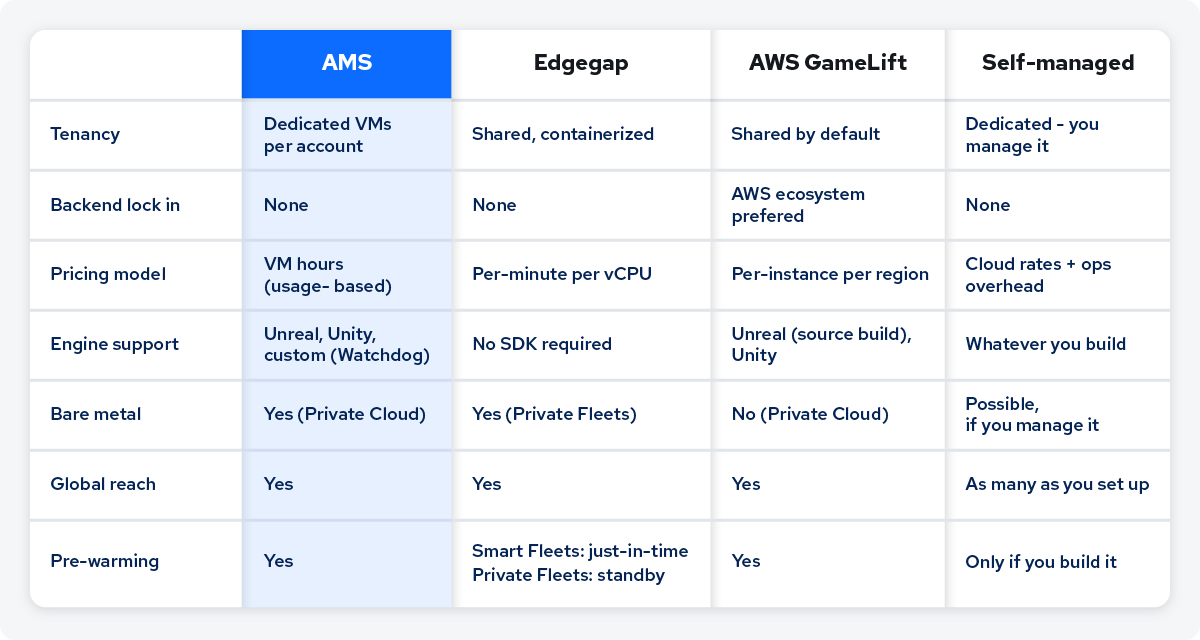 A few things worth noting:
- Edgegap: The container approach used requires no SDK integration, but consequently offers no opportunity for the game servers to do initialization tasks before the system considers it ready for players.. Shared tenancy may introduce resource variability, as game servers from different games will share compute nodes. For competitive games requiring consistent server frame times, dedicated VMs provide stronger insulation from other users.
- GameLift: Setup and integration is more complex. Pricing is per region, which can increase quickly for a global launch. Integration with Unreal requires building Unreal Engine from source, and FlexMatch is billed separately.
- Self-managed: This requires a much larger engineering effort and ongoing maintenance and operations.
If you're specifically moving off Hathora as they are shutting down, this migration guide maps the concept and API differences directly.
Studios already running on AMS
AMS is used in production by studios of all sizes, from small teams to live games operating at scale:
- AEXLAB (VAIL VR): Migrated a live VR game and optimized their setup by shifting predictable traffic to bare metal and using cloud for spikes, achieving a 46% reduction in server costs without impacting player experience. Full story.
- FuzzyBot (Lynked: Banner of the Spark): Small team, no dedicated backend engineers. AMS hosted Town and Mission servers on demand with no 24/7 provisioning. They shipped 6 months faster than building that layer themselves would have taken. Full story.
- Genun Games: A four-person team used AMS to handle multi-region dedicated server infrastructure from day one, enabling them to focus entirely on gameplay. Full story.
- Wildgate & SUPERVIVE: Both titles launched globally in the same week, relying on AMS for server provisioning, scaling, and regional distribution, letting their teams focus on gameplay. Read the full launch story.
Run Your Dedicated Servers on AMS, Free for 90 Days
Spin up a fleet and see how AMS handles scaling, failover, and regional routing with your own build. The trial includes 1,200 hours on a ttx1.s instance (2 vCPU, 2GB RAM), 50GiB of server image storage, and 50GiB of egress. No credit card required.
Get Started for Free → Talk to us →
You can also request a demo to discuss your setup before diving into integration.
Featured Blog Posts

Featured Customer Stories
.jpg?width=400&height=235&name=Firefly%20(1).jpg)


Find a Backend Solution for Your Game!
Reach out to the AccelByte team to learn more.