


If you're building a multiplayer game in Unreal Engine, you know the engine handles replication well. RPCs, actor ownership, the whole client-server model — it's all there, it works, and it's reasonably well documented.
The part that isn't well documented is what happens after that. How do players find a match? Where does the dedicated server come from? Who spins it up, manages it across regions, and shuts it down when the match ends? The Unreal forums are full of threads where developers hit this exact wall: the engine gets them to the point where two clients can talk through a server, and then everything stops being obvious.
This article walks through what UE gives you out of the box, what you still need to build or buy, how studios typically approach it, and how to set it up with AccelByte.
What Unreal Engine Gives You (and What It Doesn't)
-png.png)
Unreal Engine uses an authoritative server model. One machine owns the game state, clients replicate from it, and the engine handles most of the networking plumbing. For a lot of games, this is the right model since it’s harder to cheat, easier to keep players in sync, and the replication system is genuinely solid.
Their Online Subsystem (OSS) handles platform features. It's an abstraction layer and defines interfaces and what runs behind them depends on which subsystem you load.
Out of the box, UE ships with a few options:
- OnlineSubsystemNull: LAN-based, useful for testing basic session/replication logic.
- OnlineSubsystemSteam: For Steam-shipped games; offers lobbies, matchmaking, and server lists, but is tied to Valve's infrastructure and distribution model.
- OnlineSubsystemEOS (Epic Online Services): Free, platform-agnostic, and includes lobbies, sessions, friends, voice, and matchmaking. Its P2P relay suits listen/peer-to-peer games; authoritative dedicated servers require a separate hosting solution.
Where UE matchmaking falls short:
-png.png)
These aren't edge cases, they're the core of what shipping a multiplayer game with dedicated servers actually requires. None of them are in the engine. Let’s see how studios typically fill that gap.
Matchmaking and Dedicated Server Options for Unreal Games
- Build it yourself
Full control over every layer. Matchmaking logic and server topology exactly as your game needs them. The trade-off is months of engineering before the first match runs — production-grade matchmaking needs ticket queuing, backfill, region-aware placement, and failure handling, and server orchestration needs scaling logic, health checks, and lifecycle management on top of that.
- Good for: Large studios with dedicated teams.
- Watch out for: Engineering time pulling resources away from the game.
- Pricing: Cloud compute (AWS EC2 or equivalent) plus engineering cost.
- Off the shelf solutions
- Epic Online Services (EOS): Free, cross-platform, natively integrated with UE. Covers lobbies, sessions, friends, voice, and basic matchmaking. But it doesn’t include server hosting or orchestration and matchmaking is not a full ticket system.
- AWS GameLift: Mature managed dedicated server platform with FlexMatch for rules-based matchmaking. Official UE plugin, scales well, strong AWS integration. But it requires building UE from source, fleet management has a learning curve and per-instance pricing means paying for full capacity even at partial use.
- Unity Gaming Services Managed server hosting with rules-based matchmaking. Works with Unreal. Good onboarding path with an $800 credit and up to 5,000 PCU free. But it is primarily built around Unity workflows; some features are tighter for Unity games.
- Edgegap 600+ locations globally, no upfront commitment, endorsed by Epic through EOS. Fractional vCPU pricing keeps costs proportional to actual use. But matchmaking is a separate product requiring a separate integration.
As you’d have already figured, most out of the box solutions rarely provide both matchmaking and server hosting and orchestration. That’s one of the gaps that AccelByte fills with an already flexible matchmaking solution that can be fully customized along with a dedicated server hosting and orchestration solution.
How to Do It with AccelByte
-png.png)
AccelByte Gaming Services (AGS) is a modular game backend platform covering identity, matchmaking, sessions, economy, leaderboards, cloud save, friends, chat, and more. The two services most relevant here are Matchmaking and AccelByte Multiplayer Servers (AMS).
Both integrate into UE through a single Online Subsystem plugin. You write standard UE OSS code throughout. AMS also works as a standalone product, independent of AGS, so you can use it alongside a different matchmaking service if needed.
- What AGS Matchmaking Does
AGS Matchmaking uses match pools. You define a pool per game mode, attach a ruleset, and players submit match tickets. The service evaluates tickets continuously, groups players that meet the ruleset, creates a session, and triggers a server claim from AMS. Out of the box, it included:
- Ticket queuing and multi-pool evaluation
- Latency-aware region selection (SDK auto-pings QoS servers to keep latency data current)
- Multi-game mode support from separate pools
- Party matchmaking (party leader creates one ticket for the group)
- Auto-backfill for partial session starts and server-requested backfill to
- replace dropped players mid-match
- Custom matchmaking logic with Extend: AccelByte Extend lets you write fully custom matchmaking functions — skill-rating systems, tournament brackets, region-specific logic — and run them on AccelByte's infrastructure without managing additional servers yourself.
- What AMS Does
AMS is the dedicated server orchestration layer. It manages fleets of dedicated servers across regions, handles scaling, and keeps warm servers ready for immediate use. Here are some key capabilities:
- Warmed servers: Pre-loaded instances stay running per region — server availability is immediate when a match is found
- Multi-region: Per-region fleet sizes; a spike in one region doesn't affect another
- Watchdog agent: Manages server lifecycle on each VM (creating, claiming, draining, terminating); replaces servers automatically
Setting It Up
The AGS OSS for Unreal Engine implements UE's standard OSS interfaces with AccelByte's backend. It’s supported on UE 4.27 through UE 5.6 with three plugin components, each in its own GitHub repo:
- AGS Unreal OSS — high-level OSS layer
- AGS Unreal SDK — lower-level API client
- AGS Network Utilities — P2P and connection management
Integration steps:
- Install the three plugins under Plugins/AccelByte/ — full install guide
- Configure DefaultEngine.ini: set DefaultPlatformService=AccelByte, enable bEnableV2Sessions=true, enable lobby auto-connect
- Create an IAM client in the Admin Portal (Game Client template) — IAM guide
- Configure session template, match ruleset, and match pool — matchmaking config guide
- Enable QoS regions in the Admin Portal (AMS > QoS Regions) so the SDK collects latency data automatically
- Build your dedicated server for Linux, upload via the AMS CLI, create a fleet — fleet setup guide
- Client-side: create an FOnlineSessionSearch handle configured with your match pool name (the OSS uses this to pass matchmaking parameters and receive the result), call StartMatchmaking(), and bind delegates for OnMatchmakingComplete, SessionV2DsStatusChanged, and OnJoinSessionComplete — Unreal matchmaking integration guide
- Server-side: UE auto-login handles auth when DefaultPlatformService=AccelByte is set; call RegisterServer() to signal AMS the server is ready — dedicated server OSS guide
The full flow looks like:
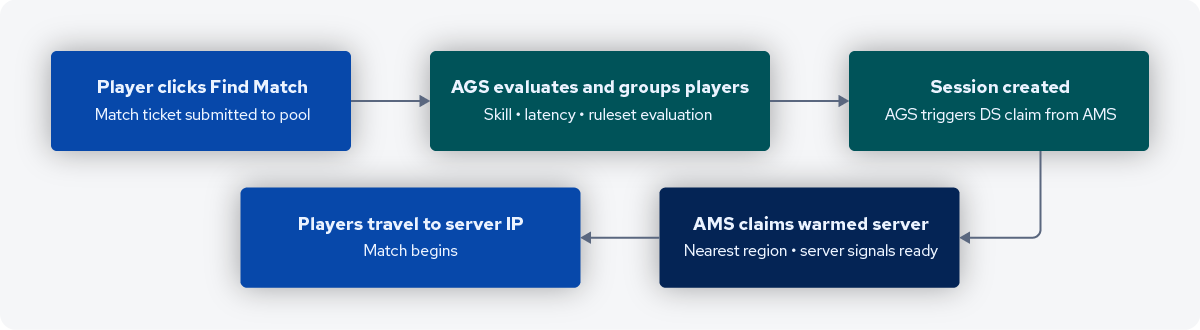
Before you go live, you can test locally first. Use the AMS Simulator to emulate watchdog interactions without uploading a build. for end-to-end testing with your actual AMS environment. Use the local DS registration flow to register a local server with your cloud namespace.
Get Your Unreal Matchmaking and Servers Running Today
Install the AGS Unreal OSS, configure your match pool, and start testing matchmaking and dedicated servers right away. AccelByte Gaming Services is free during development on public cloud, plus a 90-day trial if you've got a live game ready for end-to-end testing.
Featured Blog Posts

Bring your first player online today.
Get started for free, and scale as your game grows.