


If you know AccelByte Gaming Services (AGS), you probably know it as the backend behind large PC and console titles built in Unity or Unreal. Those titles are where most people meet AGS, but they are only part of what it runs.
AGS also runs on the web. The same services behind those big titles serve browser games, web storefronts, player portals, game launchers with an embedded browser, and internal LiveOps tools. Each of them can call AGS public APIs from frontend JavaScript.
There was a catch, though. It wasn't in the APIs. Until recently, the browser's CORS check blocked that call unless AccelByte first added your domain to an allowlist:
Access to fetch at 'https://prod.gamingservices.accelbyte.io/iam/v3/public/...'
from origin 'https://webgame.example.com' has been blocked by CORS policy:
No 'Access-Control-Allow-Origin' header is present on the requested resource.
Getting onto that allowlist meant a support ticket. You sent your domain, we changed an environment variable and ran a deployment, and then your fetch worked. On Public Cloud, you couldn't get on the allowlist at all.
The ticket was a small cost for a team already in production, but a bigger problem for anyone trying AGS for the first time. Their first origin is localhost, and nobody wants to file a ticket just to see whether a platform works on their laptop.
The usual workaround was to move the call to a server by using a full-stack framework or building a small proxy. That got past CORS, but it also added infrastructure you might not otherwise need.
AGS 2026.4.0 added namespace-level CORS configuration to the Admin Portal. AGS 2026.5.0 added a publisher-level fallback for requests without a namespace. You can now add your own origins, including localhost, on Public Cloud or Private Cloud. Nobody needs to deploy anything, and services normally pick up a saved change within about a minute.
Configure Your First Allowed Origin
Let's use a local browser app running at http://localhost:3000. The point is to get past the browser's origin check, not to change how your application authenticates.
-
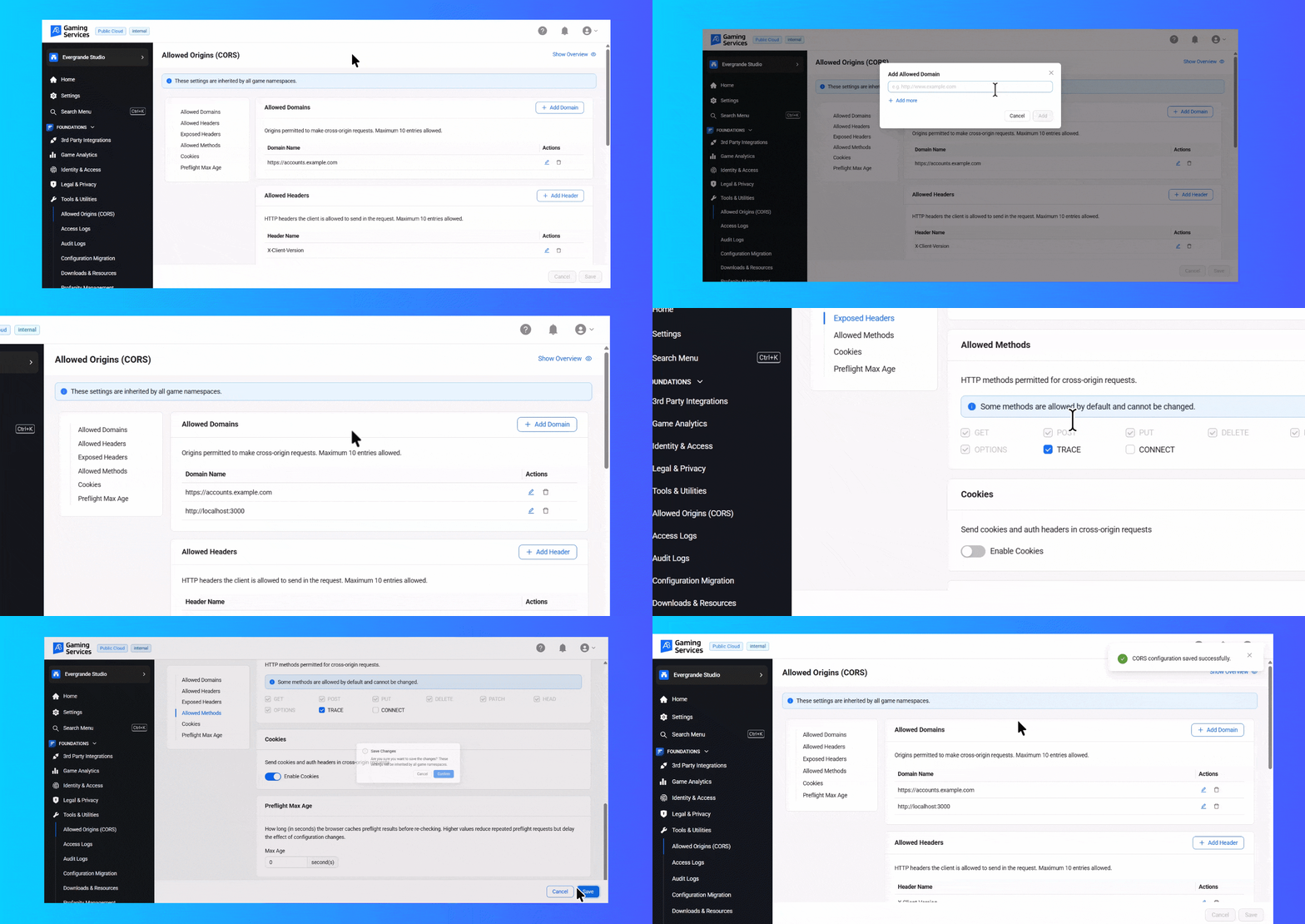
Open your game namespace in the AGS Admin Portal.
-
Go to Foundations → Tools and Utilities → Allowed Origins (CORS).
-
Under Allowed Domains, select Add Domain. Enter
http://localhost:3000(exactly the scheme, hostname, and port your browser uses). -
Save the configuration. Allow roughly a minute for the updated policy to be picked up by services.
-
Reload your application and try the browser request again. Check the Network tab if something still fails.
 One easy mistake is to add localhost without the port. To the browser,
 http://localhost:3000 and http://localhost:5173 are different origins. Add the one your development server is actually using.
Try a Request from the Browser
Once the origin is configured, you can test a real call in your frontend. Here is an example against a public IAM route that looks up a user in a game namespace. Use a player-scoped access token obtained through your application's normal login flow:
const baseURL = 'https://YOUR-AGS-BASE-URL';
const path = '/iam/v3/public/namespaces/YOUR-GAME-NAMESPACE/users/YOUR-USER-ID';

const response = await fetch(baseURL + path, {
  headers: { Authorization: `Bearer ${playerAccessToken}` },
});
console.log(response.status, await response.text());
This is an authenticated endpoint, not an anonymous health check. The token, user ID, and account permissions need to be valid for the request to succeed. Keep administrator tokens, client secrets, and other privileged credentials out of browser code.
If the browser receives an HTTP response, including a 401 or 403, you've got a more useful error than the browser's original CORS block. Check authentication and permissions next. If DevTools still reports a CORS or preflight failure, check the origin, headers, and the namespace whose policy applies.
What Allowed Origins Page Control
The Admin Portal form has six sections. Each corresponds to part of the CORS response the browser checks.
The underlying response headers are Access-Control-Allow-Origin, Access-Control-Allow-Headers, Access-Control-Expose-Headers, Access-Control-Allow-Methods, Access-Control-Allow-Credentials, and Access-Control-Max-Age.
Origins: Match What the Browser Actually Sends
AGS is deliberately strict about origins. Only clients running inside a browser engine need an Allowed Origins entry. Native PC and mobile builds using Unity or Unreal SDKs don't meet a browser CORS check, and neither do dedicated servers. Browser games, Electron and CEF launchers, embedded web views, and hybrid apps do.
An entry must be an origin and nothing more: scheme, host, and optional port. Paths, query strings, and fragments aren't part of the browser's Origin header, so AGS doesn't match them.
https://webgame.example.com        ✓ valid
https://webgame.example.com:8080   ✓ valid
http://localhost:3000              ✓ valid
https://*.example.com              ✓ valid (one subdomain label)
https://example.com/game           ✗ path is not an origin
https://*-staging.example.com      ✗ partial-label wildcard
*                                  ✗ bare wildcard
People get the wildcard rule wrong most often. A * can replace one entire subdomain label, and only the leftmost one. https://*.example.com matches https://web.example.com. It doesn't match https://a.b.example.com because that has two labels, and it doesn't match https://example.com because the wildcard label isn't there.
AGS rejects a partial wildcard such as https://*-staging.example.com. The matching rule understands * followed by a domain, not part of a hostname. It also rejects a bare *.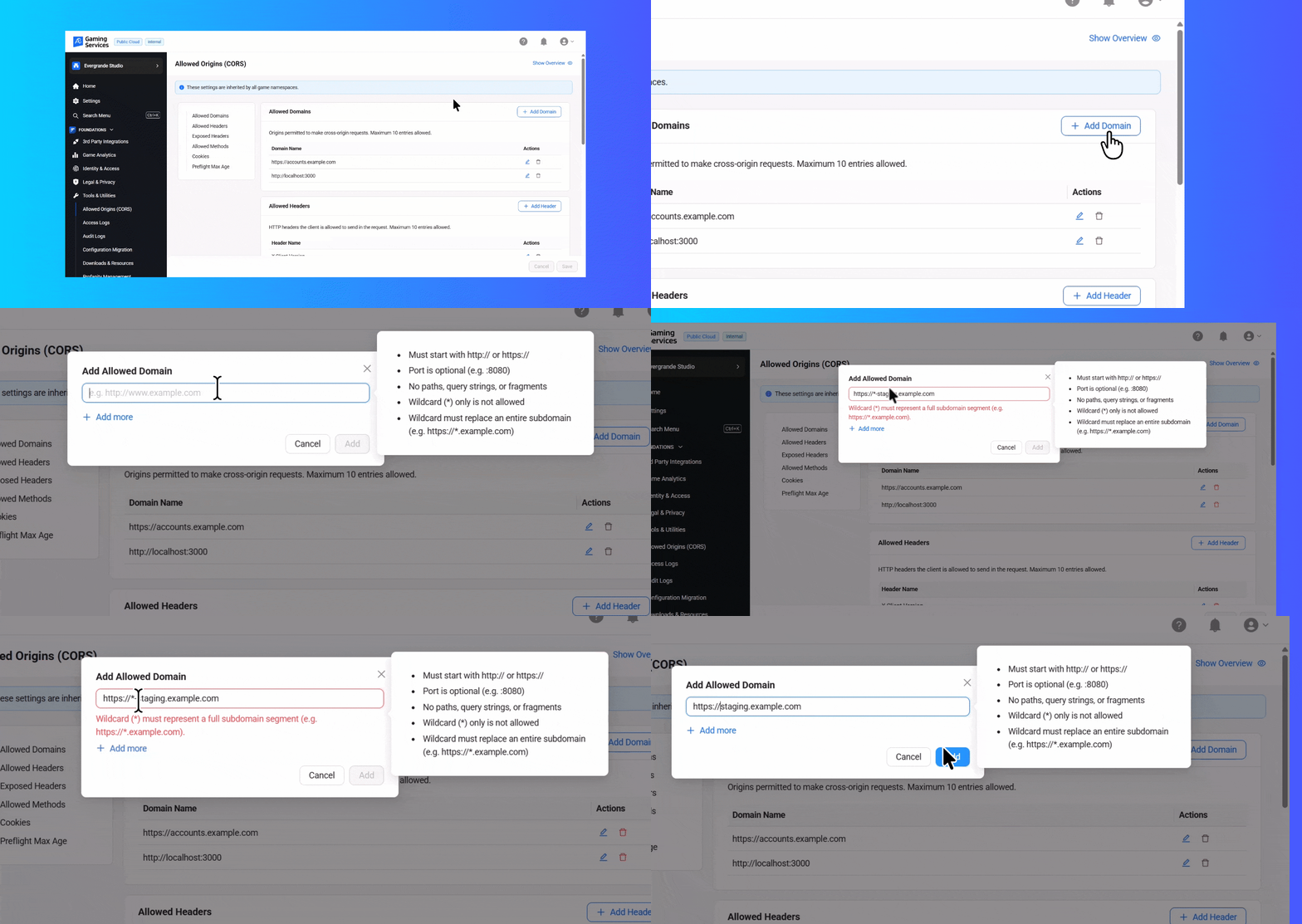
Headers, Methods, Cookies, and Preflight
A correct origin isn't always enough. Two more lists decide whether a cross-origin call works.
-
Allowed Headers is for request headers. If your frontend sends
X-Client-Version, the browser may first send anOPTIONSpreflight asking whether that header is allowed. If the header is not on the list, the browser blocks the real call and usually mentions preflight in the console. Each AGS service also has defaults; your entries add to them. -
Exposed Headers is for response headers your JavaScript needs to read. A custom response header may show up in DevTools but still return
nullwhen accessed from code. Expose it explicitly if your application needs it.
The usual HTTP methods (GET, POST, PUT, DELETE, PATCH, OPTIONS, HEAD) are enabled by default and shown as locked. The form exposes TRACE and CONNECT as optional toggles. Normal browser fetch calls cannot use those two methods, so most teams won't need to change them.
Enable Cookies only when your browser-based authentication flow needs credentialed cross-origin requests. Keep the origin list explicit. CORS decides whether browser JavaScript may read the response; it doesn't replace authentication, authorization, or CSRF protections.
Preflight Max Age is worth thinking about. A low value creates more OPTIONS round trips. A high value reduces them, but browsers may keep using a cached preflight result until it expires, subject to their own caps. It doesn't cache the actual API response.
How Namespace Inheritance Works
AGS namespaces are hierarchical. On Private Cloud, the chain is publisher → game. On Public Cloud, it's studio → game. When you open the Allowed Origins page on a game namespace, you can see parent entries marked with a lock. You can't remove them at the game level.
Set a corporate or shared domain once at the highest namespace you control, then let the game namespaces inherit it. Nobody has to remember to copy the same entries into every game.
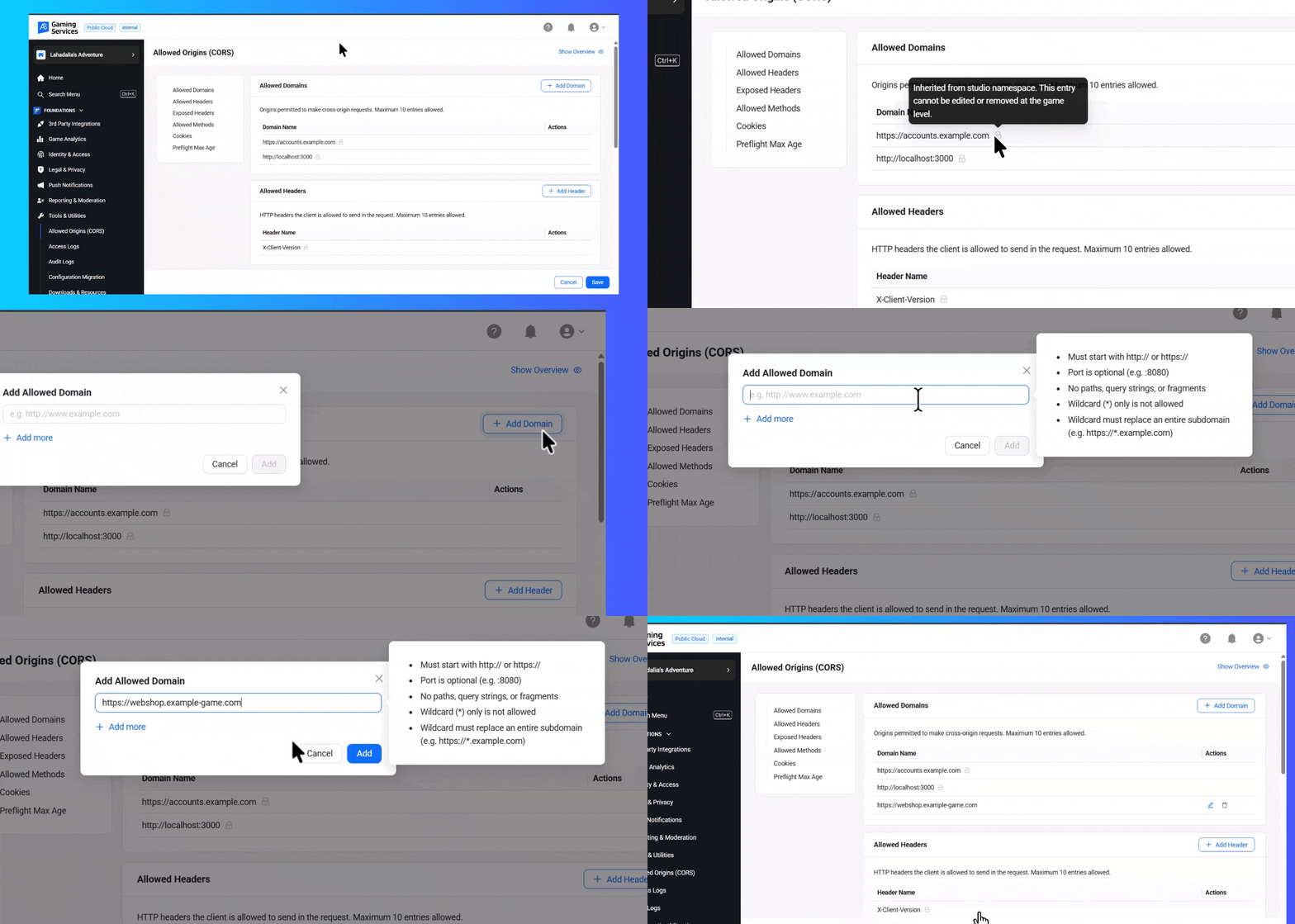 The two halves of the configuration inherit differently. List fields (allowed domains, allowed headers, exposed headers, and methods) merge as a union. AGS removes duplicates and puts parent entries first:
parent allowed_domains: ["https://accounts.example.com"]
game allowed_domains: ["https://webshop.example-game.com"]

effective allowed_domains: [
  "https://accounts.example.com",
  "https://webshop.example-game.com"
]
Cookie permission and preflight max age work the other way: the most specific namespace that explicitly sets the field wins. If the parent allows cookies but a game sets cookies_allowed: false, the game-level value applies. Unset isn't the same as false. Unset means inherit.
Which Namespace Applies to a Request?
At request time, AGS tries to resolve a namespace from the request. It checks these sources in order:
-
A
{namespace}path parameter, such as/iam/v3/admin/namespaces/accelbyte/users. -
The request subdomain, such as
accelbyte-test.prod.gamingservices.accelbyte.io. -
The
x-ab-rl-nsheader when it is present and set upstream from the namespace claim in the JWT. -
A publisher namespace fallback if none of those sources resolves a namespace. This fallback was added in AGS 2026.5.0.
The resolved namespace settings are combined with the service's deployed default CORS configuration. That is why the exact route and namespace can matter even if two requests come from the same browser origin.
Automate the Same Configuration with the Config API
This doesn't introduce another service or a new configuration model. The Config service stores CORS as a common config entry with the key CORS. You can make the same changes from a script or your CI:
GET    /config/v1/admin/namespaces/{namespace}/configs/CORS?includeParentConfig=publisher
POST   /config/v1/admin/namespaces/{namespace}/configs
PATCH  /config/v1/admin/namespaces/{namespace}/configs/CORS
DELETE /config/v1/admin/namespaces/{namespace}/configs/CORS
The includeParentConfig parameter supports publisher, studio, or both, and returns the inherited view rather than only the namespace's own row. The stored CORS value is JSON:
{
  "allowed_domains": ["https://webgame.example.com", "https://*.example.com"],
  "allowed_headers": [],
  "expose_headers": [],
  "allowed_methods": [],
  "cookies_allowed": true,
  "max_age": 600
}
Two behaviors matter before you automate this. First, PATCH replaces the whole value. It does not merge each field. Read the current object, edit it, then write the entire object back. Second, the API validates less than the Admin Portal form. An origin containing a path can be saved through the API but won't match any browser Origin header.
If the Browser Still Reports CORS
-
Check the exact origin. Protocol, hostname, and port must match.
localhost:3000andlocalhost:5173are different origins. -
Check the preflight in DevTools. A blocked
OPTIONSrequest usually points to an origin, method, or request-header mismatch. -
Check the namespace the route resolves to. A game-level origin does not automatically apply to every route that lacks a game namespace.
-
Check whether it is actually CORS. An HTTP 401/403 means you also need to investigate player authentication, permissions, or API access.
-
If you are calling your own Extend app, configure CORS on that app separately. The Admin Portal setting here controls AGS platform endpoints, not your custom Extend REST endpoints.
What This Changes
You now control the origin list. Add your production browser app, your internal web tools, and your local development server from the Admin Portal. You no longer need a proxy just to get past CORS. If you add one later, add it for an architectural reason, not for CORS. The feature shipped in AGS 2026.4.0 on July 3, 2026. AGS 2026.5.0 followed on September 4, 2026, adding the publisher namespace fallback for requests without namespace context.
-
For release details: AGS 2026.4.0 · AGS 2026.5.0
-
For custom app endpoints: Configure CORS for your Extend app
Try this with your own browser game
Connect your browser app to AccelByte Gaming Services (AGS) and start building with real backend services. AGS Public Cloud is free for your first 30 concurrent users, so you can integrate, test, and run early playtests without a monthly platform fee. When more players arrive, you pay based on usage.
You're almost signed up!
Verify your account by following the instructions sent to .
If you still haven't received an email, please check your spam folder.
Featured Blog Posts





Bring your first player online today.
Get started for free, and scale as your game grows.